

Description
Rocketship SEO is a comprehensive WordPress SEO plugin that combines traditional SEO optimization with cutting-edge AI technology. Using OpenAI’s GPT models or Google Gemini, it automatically generates optimized meta titles, descriptions, and provides intelligent SEO recommendations to boost your site’s search engine visibility.
🚀 AI-Powered Features
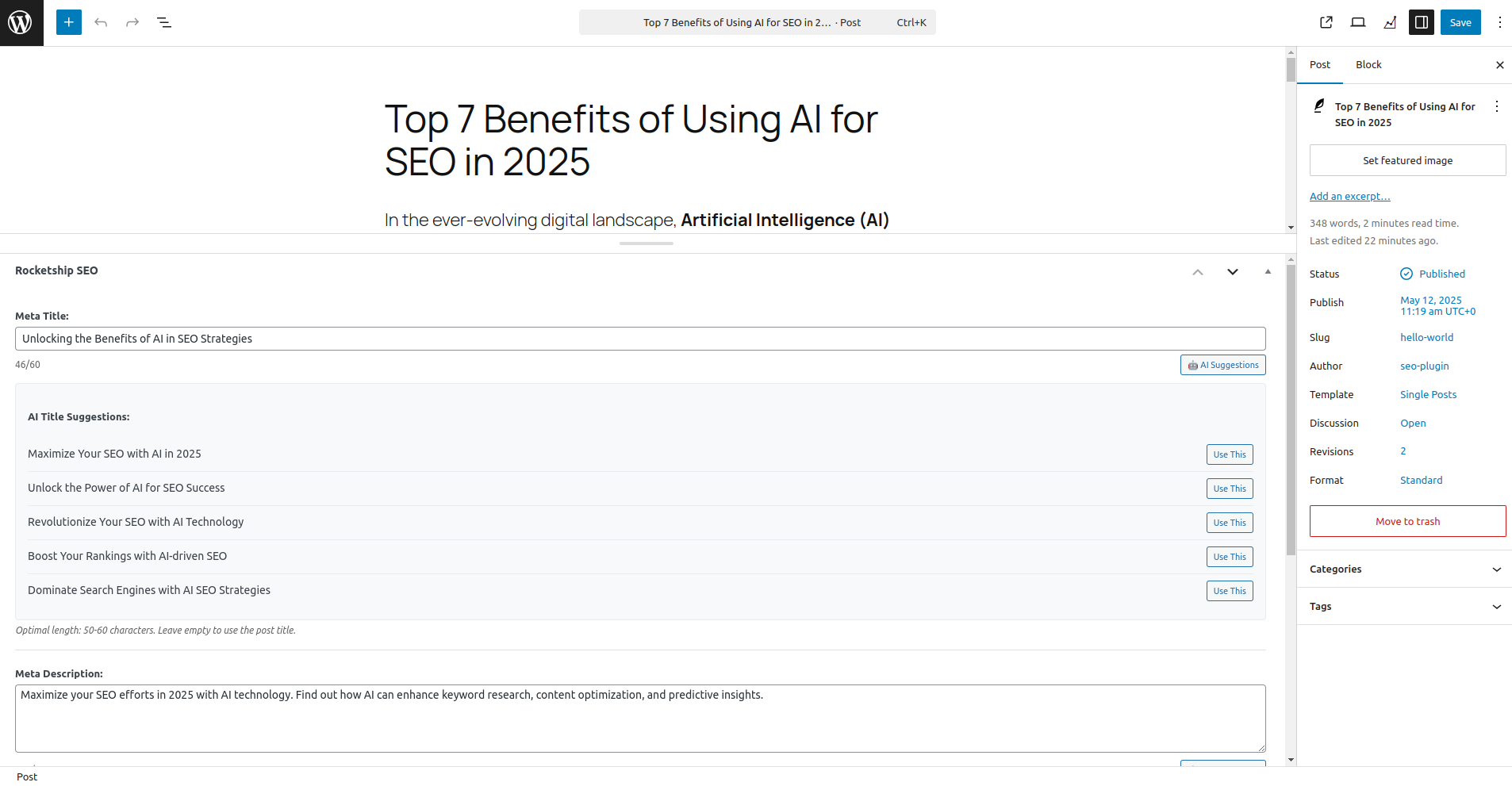
- AI Meta Title Generation: Generate compelling, SEO-optimized titles using GPT models
- AI Meta Description Creation: Create engaging descriptions that improve click-through rates
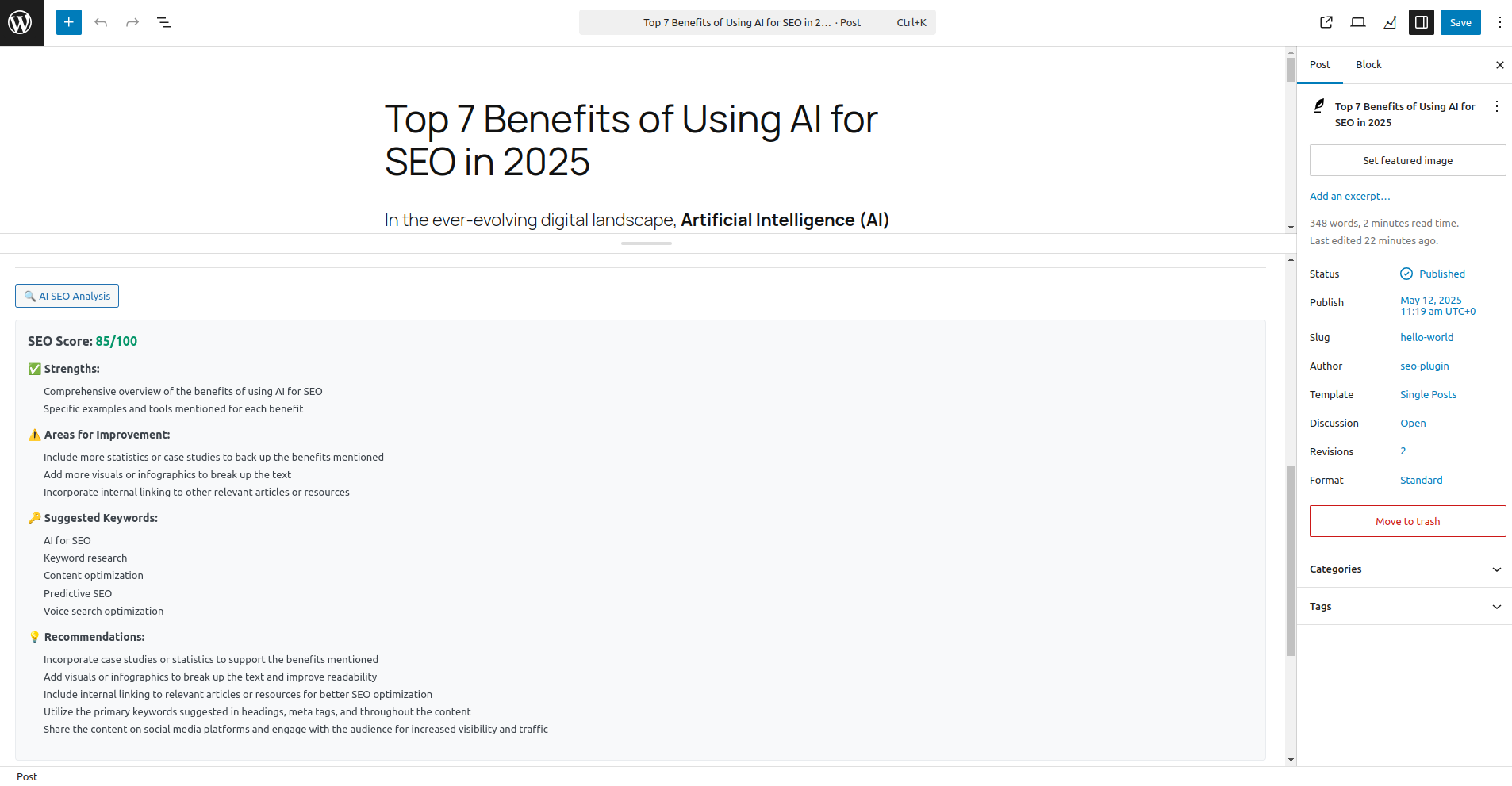
- AI Content Analysis: Get detailed SEO analysis with scoring and actionable recommendations
- Advanced AI Strategy Tools: GPT-5 powered SEO strategy, content gap analysis, and E-A-T analysis
- AI Keyword Research: Advanced keyword research with semantic analysis and competition insights
- Bulk AI Suggestions: Generate suggestions for multiple posts at once with easy apply/skip options
- Smart SEO Scoring: AI analyzes your content and provides improvement suggestions
- Multiple AI Models: Choose from OpenAI (GPT-4o-mini, GPT-4o, GPT-5, o1-preview, o1-mini) or Google Gemini (Gemini 1.5 Pro, Gemini 1.5 Flash)
📋 Media Audits — Cut Image SEO Workload
Stop fixing images one at a time. Media Audits gives you a full-library dashboard so you can find gaps, bulk-generate metadata, and export or import changes in minutes instead of hours.
- Audit Dashboard: See every image’s alt text, title, caption, description, and filename status in one searchable table
- Bulk AI Generation: Generate missing metadata for selected images—or every image matching your filters—using your existing OpenAI or Gemini API keys
- Smart Brand Context: Save a business-specific prompt template so AI suggestions match your tone, services, and keywords
- One-Click “Generate Prompt According to Business”: Auto-fills your brand context from site content so you don’t have to write prompts from scratch
- Safe File Renaming: AI-suggested SEO-friendly filenames with extension preserved and conflict handling built in
- CSV Export & Import: Download your full media audit, edit offline, or re-import AI results for batch updates
- Dual Access: Open from Media Media Audits or Rocketship SEO 📋 Media Audits
Perfect for sites with large media libraries, accessibility compliance, and teams who want image SEO done without opening every attachment in the library.
📊 Traditional SEO Features
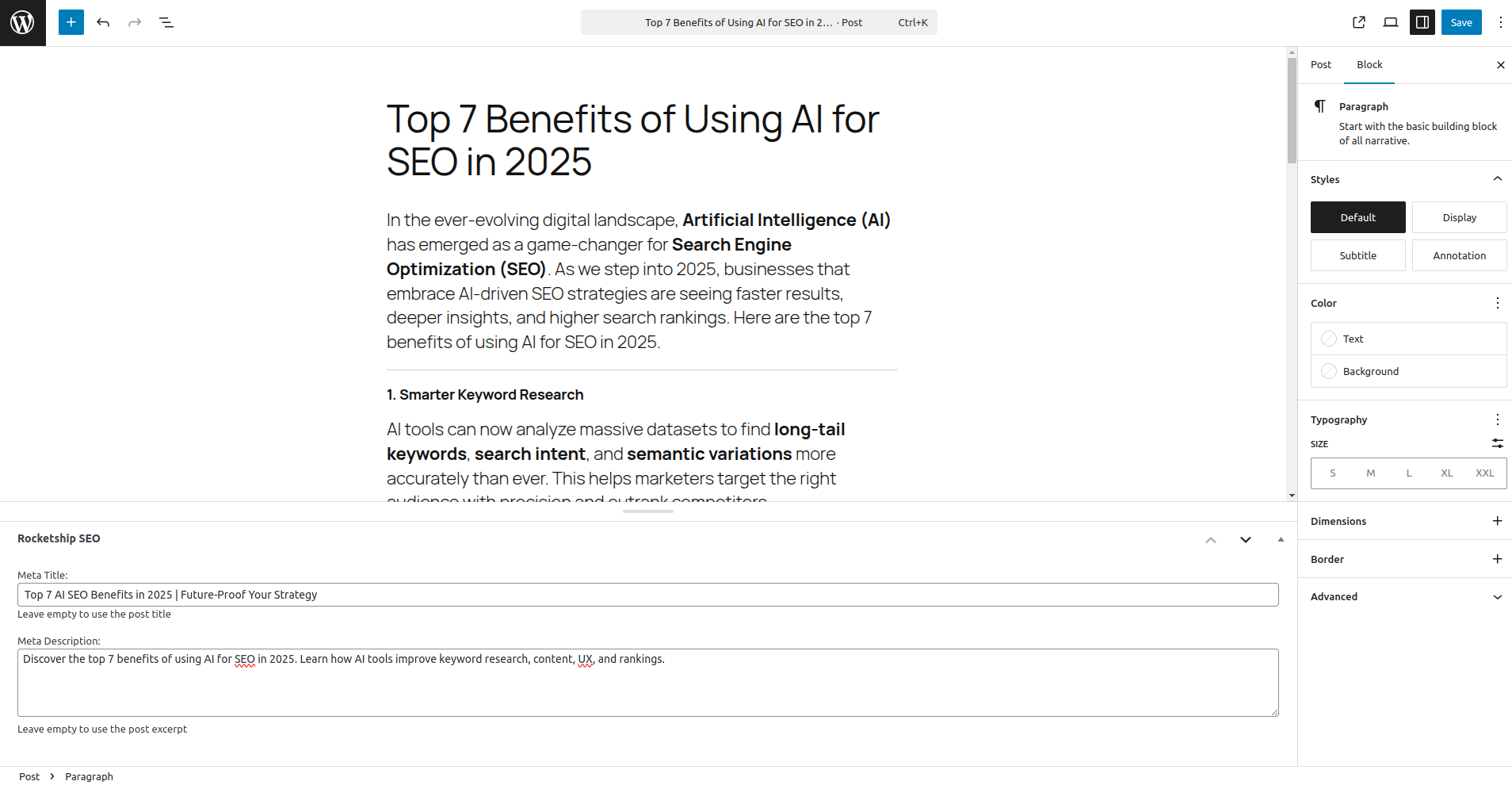
- Custom Meta Fields: Set custom meta titles and descriptions for posts and pages
- XML Sitemap Generation: Automatically generate dynamic, search engine-friendly sitemaps
- Visual Sitemap Generator: Interactive site navigation at /sitemap with multiple view modes
- Schema Markup: JSON-LD structured data for articles, websites, organizations, and more
- Open Graph Tags: Optimize content for Facebook, LinkedIn, and other social platforms
- Twitter Cards: Enhanced Twitter sharing with proper meta tags
- File Rules Editor: Professional .htaccess and robots.txt editor with backup system
- AI Image Redirect: Protect images from direct access, hotlinking, and unauthorized downloads
- Bot Redirection System: Control bot access with User-Agent detection and custom redirects
- Google Analytics Integration: View GA4 traffic data, pageviews, sessions, and user metrics directly in WordPress
- Per-Page Analytics: See analytics data for individual posts/pages in the editor metabox
- Google Reviews OAuth: Fetch ALL your Google Business Profile reviews (not limited to 5)
- Dual Authentication: Choose between API Key (simple, 5 reviews) or OAuth (unlimited reviews)
- Gutenberg Integration: Dedicated sidebar panel with real-time preview
- Classic Editor Support: Full compatibility with WordPress classic editor
🎯 Key Features
- Live Preview: See how your meta tags will appear in Google search results
- Character Counting: Visual indicators for optimal title and description lengths
- Smart Fallbacks: Automatically uses post title and excerpt when custom fields are empty
- Google Analytics Dashboard: View traffic data, top pages, and traffic sources without leaving WordPress
- Per-Content Analytics: See pageviews, sessions, and trends for each post/page in the editor
- Compatibility System: Advanced detection and conflict prevention with other SEO plugins
- Granular Override Control: Choose which SEO features to enable when other plugins are present
- Sitemap Management: Individual post/page exclusion options
- Breadcrumb Schema: Automatic breadcrumb structured data
- Robots.txt Integration: Sitemap URLs automatically added to robots.txt
- Multi-language Ready: Full internationalization support
- Performance Optimized: Efficient caching and minimal database queries
🤖 How AI Features Work
- Setup: Choose your AI provider (OpenAI or Google Gemini) and configure your API key in Rocketship SEO settings
- Choose Model: Select from OpenAI models (GPT-4o-mini, GPT-5, o1-preview) or Gemini models (Gemini 1.5 Pro, Flash)
- Generate: Click AI suggestion buttons while editing posts/pages
- Analyze: Use AI content analysis to get SEO improvement recommendations
- Advanced Tools: Access GPT-5 optimized SEO strategy, content gap analysis, and E-A-T analysis
- Bulk Process: Use AI Tools page to generate suggestions for multiple posts
- Optimize: Apply AI suggestions with one click or customize as needed
💡 Perfect For
- Content creators who want AI-powered SEO optimization
- Website owners looking to improve search rankings
- Agencies managing multiple WordPress sites
- Developers who need comprehensive SEO solutions
- Anyone wanting to save time on SEO optimization
How to Use
Basic SEO Setup
- Enable Features: Go to Rocketship SEO > General Settings and enable desired features
- Configure Sitemaps: Visit Rocketship SEO > XML Sitemap to enable sitemap generation
- Set Organization Info: Add your organization name and logo for schema markup
- Configure Social Media: Add Twitter handle and default Open Graph image
Using AI Features
For Individual Posts/Pages:
1. Edit any post or page
2. Find the Rocketship SEO panel (sidebar in Gutenberg, meta box in Classic Editor)
3. Click “🤖 AI Suggestions” button next to title or description fields
4. Review generated suggestions and click “Use This” for your preferred option
5. Click “🔍 AI SEO Analysis” for detailed content analysis and recommendations
For Bulk Operations:
1. Go to Rocketship SEO > AI Tools (appears when AI is enabled)
2. Select posts you want to optimize or use filters (category, date range, etc.)
3. Choose “Generate Titles” or “Generate Descriptions”
4. Review suggestions and apply or skip for each post
5. Use “Apply All” for bulk operations
Content Analysis
- Open the AI SEO Analysis panel while editing content
- Review your SEO score (0-100)
- Check “Strengths” section for what’s working well
- Follow “Improvements” suggestions for better optimization
- Use “Suggested Keywords” to enhance your content
- Implement “Recommendations” for maximum SEO impact
Using Google Analytics
Initial Setup:
1. Go to Rocketship SEO > Google Analytics
2. Click “Connect with Google” and authorize access
3. Select your GA4 property from the dropdown
4. View your traffic data immediately!
Dashboard Features:
* Overview Tab: Pageviews, sessions, users, bounce rate
* Top Pages Tab: Most visited content with metrics
* Traffic Sources Tab: Source/medium breakdown
* Date Range Selector: 7, 30, 90, or 365 days
Per-Post Analytics:
1. Edit any post or page
2. Find the “Google Analytics” metabox in the sidebar/below content
3. View pageviews, sessions, and users for that specific page
4. See 7-day trend chart for quick performance insights
XML Sitemap Features
- Main Index: Access at
yoursite.com/sitemap_index.xml - Post Sitemap:
yoursite.com/post-sitemap.xml - Page Sitemap:
yoursite.com/page-sitemap.xml - Exclude Pages: Use checkbox in editor to exclude specific content
- Submit to Search Engines: Only submit the main sitemap index URL
Screenshots



Blocks
This plugin provides 2 blocks.
- Preferred Source Button Displays Google's Preferred Source button so readers can mark this site as a preferred source in Google Search results.
- Rocketship Content Series Displays the Content Series box for this post — the series title, description and links to the other articles in the series.
Installation
Automatic Installation
- Go to Plugins > Add New in your WordPress admin
- Search for “Rocketship SEO”
- Click Install Now and then Activate
- Go to Rocketship SEO in admin sidebar to configure settings
Manual Installation
- Download the plugin zip file
- Upload to
/wp-content/plugins/directory - Extract the files
- Activate through the ‘Plugins’ menu in WordPress
- Configure settings in Rocketship SEO admin panel
AI Setup (Optional but Recommended)
- Get an API key from OpenAI (https://platform.openai.com/api-keys) or Google AI Studio (https://aistudio.google.com/app/apikey)
- Go to Rocketship SEO > General Settings
- Scroll to “AI-Powered SEO Recommendations” section
- Enter your API key and choose your preferred AI model
- Enable AI recommendations
- Start using AI features in post/page editors
FAQ
-
How do I get started with AI features?
-
For OpenAI:
1. Sign up for an OpenAI account at https://platform.openai.com
2. Create an API key in your OpenAI dashboard
3. Go to Rocketship SEO > General Settings
4. Select “OpenAI” as your AI provider
5. Enter your API key in the “AI-Powered SEO Recommendations” section
6. Choose your preferred AI model (GPT-4o-mini for speed, GPT-5 for quality)
7. Enable AI recommendations and start using the featuresFor Google Gemini:
1. Visit Google AI Studio at https://aistudio.google.com/app/apikey
2. Create a Gemini API key
3. Go to Rocketship SEO > General Settings
4. Select “Google Gemini” as your AI provider
5. Enter your API key in the “AI-Powered SEO Recommendations” section
6. Choose your preferred model (Gemini 1.5 Flash for speed, Gemini 1.5 Pro for quality)
7. Enable AI recommendations and start using the features -
Which AI model should I choose?
-
OpenAI Models:
* GPT-4o-mini: Fast and cost-effective, great for most users
* GPT-4o: Optimized performance with great quality
* GPT-5: Most advanced capabilities for complex SEO analysis
* o1-preview: Best for detailed SEO strategy and reasoningGoogle Gemini Models:
* Gemini 1.5 Flash: Fast responses with great quality, cost-effective
* Gemini 1.5 Flash-8B: Ultra-fast for simple tasks
* Gemini 1.5 Pro: Best overall performance and quality
* Gemini Pro: Stable and reliable performance -
How much do AI features cost?
-
AI features use your chosen provider’s API credits. Approximate costs per suggestion:
OpenAI Pricing:
* GPT-4o-mini: ~$0.001-0.002 per suggestion (very affordable)
* GPT-4o: ~$0.01-0.03 per suggestion
* GPT-5: ~$0.03-0.08 per suggestion
* o1-preview: ~$0.05-0.15 per suggestionGoogle Gemini Pricing:
* Gemini 1.5 Flash-8B: ~$0.0001-0.0003 per suggestion (extremely affordable)
* Gemini 1.5 Flash: ~$0.0005-0.001 per suggestion (very affordable)
* Gemini 1.5 Pro: ~$0.002-0.005 per suggestion
* Gemini Pro: ~$0.001-0.003 per suggestionMost users spend $1-5 per month with OpenAI or $0.50-$2 per month with Gemini for regular optimization.
-
Can I use the plugin without AI features?
-
Absolutely! All traditional SEO features work independently. You can:
* Set custom meta titles and descriptions manually
* Generate XML sitemaps
* Add schema markup and social media tags
* Use all features without an OpenAI API key -
Will this conflict with other SEO plugins?
-
Rocketship SEO includes advanced compatibility settings to prevent conflicts:
* Automatic Detection: Detects RankMath, Yoast SEO, All in One SEO, SEOPress, and The SEO Framework
* Smart Compatibility: Configure which features to override in Rocketship SEO > General Settings > Compatibility Settings
* Granular Control: Choose to override only specific features (title, description, schema, Open Graph, Twitter Cards)
* Safe Fallback: If no override options are selected, Rocketship SEO disables all meta output to prevent conflicts
* Admin Notices: Get notified when conflicting plugins are detected with easy access to compatibility settings -
How accurate are the AI suggestions?
-
AI suggestions are highly optimized for SEO best practices, but you should:
* Review suggestions before applying them
* Ensure they match your brand voice and style
* Customize suggestions to fit your specific needs
* Use them as starting points for further optimization -
Can I edit AI-generated content?
-
Yes! AI suggestions are just starting points. You can:
* Click suggestions to apply them and then edit as needed
* Use suggestions as inspiration for your own content
* Combine multiple suggestions
* Always review and customize for your brand -
Does the plugin work with Gutenberg and Classic Editor?
-
Yes! The plugin provides:
* Gutenberg: Dedicated sidebar panel with live preview
* Classic Editor: Traditional meta box below the content
* Both: Full AI functionality and real-time character counting -
How often should I use AI features?
-
- New Content: Use AI suggestions for every new post/page
- Existing Content: Run bulk analysis monthly or quarterly
- High-Priority Pages: Re-analyze when content changes significantly
- Regular Audits: Use AI Tools page for site-wide optimization
-
What data does the plugin send to AI providers?
-
Only the content you choose to analyze:
* Post titles and content (for generating suggestions)
* No personal data, user information, or site credentials
* Data is processed according to your chosen provider’s privacy policy (OpenAI or Google)
* You control what content is analyzed -
Can I switch between OpenAI and Gemini?
-
Yes! You can easily switch between providers:
* Change the AI Provider setting in Rocketship SEO settings
* Add the appropriate API key for your chosen provider
* All features work identically with both providers
* Test both to see which works best for your needs -
Can I use this for client websites?
-
Yes! The plugin is perfect for agencies:
* Use your own API key (OpenAI or Gemini) across multiple sites
* Generate professional SEO content quickly
* Provide detailed SEO analysis reports to clients
* Save time on manual SEO optimization
* Gemini offers more affordable pricing for high-volume usage -
How do I set up Google Analytics integration?
-
- Go to Rocketship SEO > Google Analytics in your WordPress admin
- Click “Connect with Google” to start the OAuth flow
- Sign in with a Google account that has access to your GA4 properties
- After authorization, select your GA4 property from the dropdown
- Start viewing your analytics data directly in WordPress!
Requirements:
* A Google Analytics 4 (GA4) property (not Universal Analytics UA-xxxxx)
* Google Cloud project with these APIs enabled:
– Google Analytics Data API
– Google Analytics Admin API
* OAuth 2.0 credentials (Client ID and Client Secret) from Google Cloud Console -
Why don’t I see any GA4 properties after connecting?
-
If no properties appear after OAuth connection:
- Enable the Admin API: Go to Google Cloud Console and enable “Google Analytics Admin API”
- Check GA4 Access: Make sure the connected Google account has access to GA4 properties (not just Universal Analytics)
- Reconnect: Click Disconnect and reconnect with Google to refresh the OAuth scopes
- Verify Property Type: Only GA4 properties are supported (properties/123456789 format)
-
What Google Analytics data can I see?
-
The Google Analytics dashboard shows:
* Overview: Pageviews, sessions, users, bounce rate, average session duration
* Top Pages: Most visited pages with detailed metrics
* Traffic Sources: Where your visitors come from (source/medium breakdown)
* Date Ranges: View data for last 7, 30, 90, or 365 days
* Per-Post Analytics: Individual page metrics in post/page editor metabox -
How do I optimize for better search rankings?
-
- Use AI Analysis: Get specific recommendations for each page
- Follow Character Limits: Keep titles 50-60 chars, descriptions 150-160 chars
- Include Target Keywords: Use AI suggestions with your focus keywords
- Optimize Schema Markup: Enable structured data for better search display
- Regular Audits: Use bulk AI tools monthly to maintain optimization
-
What if I need help?
-
- Check this FAQ for common questions
- Visit our documentation at https://www.joeyoungblood.com/rocketship-seo-docs
- Contact support through our website
- Join our community forum for tips and best practices
Reviews


Contributors & Developers
“Rocketship SEO” is open source software. The following people have contributed to this plugin.
Contributors
Translate “Rocketship SEO” into your language.
Interested in development?
Browse the code, check out the SVN repository, or subscribe to the development log by RSS.
Changelog
1.0.80
✅ **COMPATIBILITY**: Fully compatible with WordPress 5.0 through the latest WordPress 7.1, and with PHP 7.0 through the latest PHP 8.x releases
🐛 **FIX**: No more "translation loading was triggered too early" notice on WordPress 6.7 and newer
🐛 **FIX**: Removed "wpdb::prepare was called incorrectly" notices in the Redirect Manager and Bot Detector
🗺️ **FIX**: Legacy rocketship-sitemap.xml now redirects correctly to sitemap_index.xml, and sitemaps no longer get a trailing-slash redirect
🔁 **FIX**: Redirects table is now created on activation, so redirects work immediately (including WP-CLI activation)
⚙️ **FIX**: Activation no longer fails on hosts with an unlimited PHP memory limit (-1)
🔒 **SECURITY**: Hardened nonce checks on AJAX requests
📊 **FIX**: Bot Detector charts no longer error when redrawn on the dashboard
1.0.79
🔒 **SECURITY**: PHP2Shell security updates
1.0.78
🛡️ **NEW FEATURE**: AI Agent & Scraper Protection — find it under Rocketship SEO → 🛡️ AI Agent Protection. Detects automated browsers, AI crawlers and content scrapers, gives every visit a 0–100 risk score from several clues, and decides whether to allow, monitor, challenge or temporarily block it
⚠️ **NEW**: "AI Agent Activity Detected" warning screen with a "Verify I am human" button — served by the server (not just a JavaScript overlay), so protected content is never sent until the visitor passes. Heading, message, button text, colour and contact link are all customisable, with an admin-only preview
🤖 **NEW**: Detects AI browser agents such as Claude in Chrome (by the on-screen indicator it adds to pages it controls) and browsers driven by Playwright, Puppeteer and Selenium (navigator.webdriver), using a tiny deferred script that sends nothing for normal visitors
🕷️ **NEW**: Scraping protection — per-visitor rate limits, sustained-crawl and page-by-page pagination detection, and REST API scraping limits. Visitors are identified by IP + browser + language, so people sharing an office or mobile network are not penalised together
🔍 **SEO SAFE**: Real Googlebot and Bingbot are verified (reverse DNS plus Google's and Bing's published IP ranges) and always allowed; fake "Googlebot" requests are caught. Other verified search engines can be allowed too
🧠 **NEW**: Separate rules for AI training crawlers (GPTBot, ClaudeBot, CCBot…), AI search crawlers (OAI-SearchBot, PerplexityBot…) and user-directed AI agents (ChatGPT-User, Claude-User…) — allow, allow and log, or block each group. OpenAI and Perplexity bots are verified against their published IP lists
👀 **SAFE START**: Off by default, and starts in Monitor-only mode when enabled — see exactly who would be challenged or blocked before anything is enforced. Conservative, Balanced and Strict sensitivity presets (or custom thresholds), and a single weak clue never shows the warning screen
📊 **NEW**: Activity dashboard with suspicious-request totals, crawler categories, top detection reasons, risk scores, actions taken, and a filterable, paginated log with reference IDs that match the warning screen
🧰 **NEW**: Tools tab with a Request Tester (see how any User-Agent and IP would be scored) and one-click "Clear all temporary blocks" for quick recovery
❓ **NEW**: "How it works" guide — a step-by-step pop-up with a visitor-journey flow diagram, the four outcomes, a setup checklist and plain-language tips, showing your site's own thresholds and setup status
☁️ **OPTIONAL**: Cloudflare integration — sync a WAF rule that blocks or challenges AI crawler categories at the edge, and add Cloudflare Turnstile to the verification challenge. API credentials can be kept in wp-config.php and are never shown again after saving
🔒 **PRIVACY & SAFETY**: No IP addresses stored by default (keyed hashes instead; optional truncated IPs), logs auto-delete after 14 days with a row cap, wp-admin, login, cron, feeds, robots.txt and sitemaps are never blocked, logged-in team members are never challenged, proxy headers are only trusted from Cloudflare or configured proxies, and every visitor and search engine sees the same content (no cloaking)
⚡ **CACHE FRIENDLY**: Challenge and block responses are never cached (LiteSpeed, WP Rocket, WP Super Cache, W3TC and CDNs), normal pages stay fully cacheable, and the plugin's assets refresh automatically after updates
🐛 **FIX**: Google Preferred Source Button added with the `[preferred_source_button]` shortcode or block could appear empty when another plugin or a block theme removed Google's script — the button now always loads its script and asks LiteSpeed, WP Rocket and Cloudflare Rocket Loader not to delay it
1.0.76
🎨 **REDESIGNED**: Floating Content Series panel has a cleaner, more professional look — a small "SERIES" label above the series title, crisp line icons for collapse and close, soft rounded corners and shadow, and a gentle fade-in — so it blends in with modern themes instead of looking like a pop-up
📜 **IMPROVED**: No more visible scrollbar inside the floating panel — longer series still scroll smoothly with the mouse wheel or touch, and scrolling the panel no longer scrolls the page behind it
📋 **IMPROVED**: Articles in the floating panel are now shown as clean, full-width rows with muted part numbers and a hover highlight — easier for readers to scan and tap, which helps them move on to the next article in the series and keeps them on your site longer
🖼️ **IMPROVED**: The series image is shorter inside the floating panel, so more of the article list is visible at a glance
📱 **IMPROVED**: On phones the floating panel becomes a full-width sheet with rounded inner corners that stays out of the way of your content
♿ **ACCESSIBILITY**: Removed the decorative emoji from the panel header and respects the visitor's "reduce motion" setting
1.0.75
📚 **NEW FEATURE**: Content Series — group related posts and pages into ordered (Part 1, Part 2, …) or unordered series from Rocketship SEO → Content Series, with drag-and-drop ordering, an optional pillar page, and post/page search
🔗 **NEW**: Every article in a series automatically gets a styled, responsive Series box with crawlable permalink links to the other articles (top / middle / bottom / manual placement); top placement sits below the Table of Contents and bottom placement sits above the Preferred Source button
🧱 **NEW**: `[rocketship_series]` shortcode and "Rocketship Content Series" Gutenberg block for manual placement — a box already in the content is never inserted twice
🎨 **NEW**: Per-series styling (background color, border color, border style) and a display limit (2 / 5 / 10 / all other articles) with a live preview in the editor
🛡️ **NEW**: A post or page can belong to only one series — enforced in the UI, on save, and with a database UNIQUE key
🧩 **NEW**: Structured data — the existing Article/WebPage JSON-LD now includes `isPartOf` → `CreativeWorkSeries` (and `position` for ordered series); new `rocketship_seo_singular_schema` filter
🎯 **NEW**: `[rocketship_series id="3"]` and a series dropdown in the block — show any series on any page (Auto-detect stays the default); pasting the shortcode into the editor converts it to the block
📍 **NEW**: "Also display on" — assign a series box to extra pages/posts that are not part of the series (e.g. landing pages)
🧭 **NEW**: More placements — left/right alignment inside the content, floating collapsible panels in any screen corner (full-width bar on phones), and a "Rocketship Content Series" sidebar widget for classic themes
1.0.74
🎯 **NEW**: Center alignment option added to "Add to Blog Post" position control for the Preferred Source Button — choose Left, Center, or Right
📋 **REFINED**: Copy button on the Preferred Source Button instructions page is now scoped to the shortcode example only, keeping the code reference rows clean
🧱 **CONSISTENT**: Center alignment matches the Gutenberg block's existing Left/Center/Right alignment support for a unified experience across shortcode, block, and auto-inserted blog post placement
1.0.73
🎛️ **NEW**: Enable/Disable toggle for the Preferred Source Button feature — turn off the publisher script, prefetch hint, shortcode, and block from Settings without deactivating the plugin
📋 **NEW**: Copy buttons added next to every code snippet and shortcode example on the Preferred Source Button instructions page, for one-click copying
📰 **NEW FEATURE**: "Add to Blog Post" — automatically insert the Preferred Source Button into every blog post, no shortcode or block needed
📍 **NEW**: Position control for "Add to Blog Post" — choose Left side, Right side, or Below the blog post content
🐛 **FIX**: Fixed the button rendering at zero width (invisible) in the Left/Right positions, caused by float shrink-to-fit sizing colliding with Google's 100%-width button markup
✅ **UX**: Live status cards on the Preferred Source Button tab now reflect the feature's enabled state and blog-post placement at a glance
1.0.72
🤖 **NEW SECTION**: "Agentic Optimization" groups LLMs.txt and the new Preferred Source Button under one place in the Rocketship SEO menu, styled consistently with the rest of the plugin's admin pages
⭐ **NEW FEATURE**: Google Preferred Source Button integration — publisher script and prefetch hint added automatically, no manual code required
🧩 **NEW**: `[preferred_source_button]` shortcode renders the button placeholder anywhere in your content
🧱 **NEW**: "Preferred Source Button" Gutenberg block, grouped under its own "Agentic Optimization" block category in the inserter
🔗 **COMPATIBLE**: Existing LLMs.txt Manager continues to work unchanged, now living under the Agentic Optimization → LLMs.txt tab
🐛 **FIX**: Corrected a CSS text-fill issue that made the "AGENTIC" badge text next to the page title render invisible
1.0.71
📝 **NEW**: Debug Logging toggle on the General Settings page — enable or disable diagnostic output with a single checkbox
🚀 **OPTIMIZED**: Logging is disabled by default on production sites, helping keep debug log files lean and manageable
🎯 **ENHANCED**: Centralized logging across all Rocketship SEO modules for cleaner, more consistent diagnostics when you need them
💡 **CLARITY**: Helpful on-screen guidance on when to turn logging on for troubleshooting and when to leave it off for everyday use
✨ **POLISHED**: Smoother, quieter operation out of the box while still giving you full visibility whenever you choose to enable it
1.0.70
🖼️ **IMPROVED**: AI Image Protection now serves thumbnails, WebP sizes, and gallery images reliably on LiteSpeed and Hostinger hosting
⚡ **ENHANCED**: Smarter image routing through WordPress with refined path handling for faster, cleaner image delivery on your pages
🛡️ **STRENGTHENED**: Image handler runs earlier in the WordPress lifecycle for seamless compatibility with Swiper sliders, themes, and page builders
🧹 **NEW**: Automatic cleanup of uploads `.htaccess` rules when AI Image Protection is disabled, or when the plugin is deactivated or uninstalled
✨ **POLISHED**: More dependable image protection that keeps your site visuals looking great while guarding against hotlinking and unauthorized access
1.0.69
ℹ️ **NEW**: Protection Status indicator on AI Image Protection settings page — shows active/inactive state and confirms whether the .htaccess rule is in place in the uploads directory
⚠️ **NEW**: Caution box always visible on AI Image Protection settings page warning about potential 404 errors before enabling, with step-by-step recovery instructions
1.0.68
⚠️ **NEW**: Persistent admin notice shown across all WordPress admin pages when AI Image Protection is enabled, warning that images may return 404 errors and linking directly to the disable option
1.0.67
✨ **IMPROVED**: Compatibility settings now give you independent control over each SEO feature — title, meta description, canonical URL, Open Graph, Twitter Cards, schema, and indexing
🔗 **NEW**: Dedicated “Allow Rocketship SEO to output canonical URL tags” option for precise canonical ownership
🎯 **SMARTER**: When an override is enabled, Rocketship SEO outputs that metadata and cleanly coordinates with supported third-party SEO plugins (Yoast SEO, Rank Math, All in One SEO, SEOPress, and The SEO Framework)
✅ **UX**: Compatibility page now shows clear Active / Inactive status next to every override, with checkboxes that stay in sync after saving
🧭 **CLARITY**: Updated help text so each option explains exactly what happens when it is enabled or left with your other SEO plugin
🚀 **POLISHED**: Document title is handled through WordPress title filters for a single clean `<title>` tag, while unrelated third-party SEO output continues working unless you choose to override it
1.0.66
📋 **MAJOR FEATURE**: Media Audits — full Media Library SEO dashboard built into Rocketship SEO
✨ **NEW**: Audit every image's alt text, title, caption, description, and filename from one searchable, filterable screen
🤖 **NEW**: Bulk AI generation for selected images or all filtered results — fix dozens or hundreds of images without opening each attachment
🏷️ **NEW**: Brand context prompt template with "Generate Prompt According to Business" to tailor AI output to your site automatically
📁 **NEW**: Safe SEO-friendly file renaming with original extensions preserved
📊 **NEW**: CSV export/import for offline review and batch updates
🧭 **NEW**: Available under **Media → Media Audits** and **Rocketship SEO → 📋 Media Audits**
⚡ **WORKLOAD SAVER**: Uses your existing Rocketship SEO AI settings — no separate API setup required
🎯 **ACCESSIBILITY & SEO**: Quickly spot missing alt text and incomplete metadata before they hurt rankings or compliance
1.0.65
✅ **COMPATIBILITY**: Improved compatibility with newer versions of WordPress, including WordPress 7.0 and recent 6.9.x releases.
🔧 **IMPROVED**: Refined internal hooks and admin integration for smoother operation on current WordPress releases.
1.0.64
♻️ **REFINED**: Refined internal code paths and improved overall stability.
✅ **COMPATIBILITY**: Improved compatibility across a wider range of hosting environments and plugin/theme combinations.
1.0.61
🔧 **FIX**: Activation failure handling is now fully graceful for missing PHP requirements (including mandatory `mbstring`) with no `wp_die()` fatal screen.
✨ **IMPROVED**: Failed activation notice is displayed directly below the Rocketship SEO plugin row on the Plugins page for clearer visibility.
🔒 **HARD REQUIREMENT**: `mbstring` remains required; plugin deactivates itself safely and provides cPanel/shared-hosting fix steps.
1.0.60
🔧 **FIX**: Table of Contents markup is now valid HTML (`<style>` moved out of `<ul>`; nested lists use proper `<li>` / `<ul>` structure).
🔧 **FIX**: Document title (`<title>`) output is preserved while Rocketship SEO filters still apply; removed erroneous stripping of `_wp_render_title_tag` from core output paths.
🔧 **FIX**: Removed bogus Open Graph image URL and placeholder Twitter site handle from compatibility override fallbacks.
✨ **IMPROVED**: TOC link inline styles no longer duplicate `font-size`.
1.0.59
✅ **COMPATIBILITY**: Tested and verified compatibility with WordPress 7.0 (releasing April 9, 2026)
✅ **COMPATIBILITY**: Verified compatibility with WordPress 6.9.4 stable release
🔄 **FUTURE-READY**: Plugin ready for WordPress 7.0's real-time collaboration features
📝 **DOCUMENTATION**: Updated compatibility information for latest WordPress releases
1.0.58
🔧 **FIX**: Google Analytics property listing now uses correct API endpoint (accountSummaries)
✨ **IMPROVED**: Added analytics.edit scope for proper GA Admin API access
📝 **DOCUMENTATION**: Comprehensive Google Analytics setup guide added to README
❓ **FAQ**: Added troubleshooting FAQs for GA4 property connection issues
📚 **DOCS**: Updated feature descriptions to highlight Google Analytics integration
🎯 **UX**: Better error messages when GA Admin API is not enabled
🔍 **DEBUG**: Enhanced logging for Google Analytics API calls
1.0.57
📊 **MAJOR FEATURE**: Google Analytics Integration - View traffic data directly in WordPress!
✨ **NEW**: Dedicated Google Analytics admin dashboard with pageviews, sessions, users, and more
🔗 **NEW**: OAuth 2.0 authentication using existing Google credentials pattern
📈 **NEW**: Real-time analytics overview with date range selection (7, 30, 90, 365 days)
📄 **NEW**: Top Pages report showing most visited content with detailed metrics
🔀 **NEW**: Traffic Sources breakdown (source/medium analysis)
📝 **NEW**: Post/Page editor metabox showing analytics for individual content
📉 **NEW**: Mini charts in metabox displaying 7-day pageview trends
🎯 **NEW**: GA4 Property selector supporting multiple Analytics accounts
⚡ **NEW**: Automatic token refresh for uninterrupted analytics access
🎨 **UX**: Modern, responsive design matching WordPress admin aesthetics
🔒 **SECURITY**: Secure credential storage with proper nonce verification
1.0.56
🔒 **SECURITY**: Enhanced security measures and vulnerability patches
✅ **WORDPRESS**: Tested and verified compatibility with WordPress 6.8 stable release
📝 **CODE QUALITY**: Optimized code comments for better documentation and maintainability
🛡️ **HARDENING**: Improved input sanitization and output escaping throughout the plugin
⚡ **OPTIMIZATION**: Streamlined codebase with cleaner, more efficient comments
1.0.55
🔧 **CRITICAL FIX**: Resolved critical error message display issue
🏗️ **ARCHITECTURE**: Major architecture design update for improved code organization
⚡ **PERFORMANCE**: Optimized plugin structure for better maintainability
🛡️ **STABILITY**: Enhanced error handling and prevention mechanisms
1.0.54
🔧 **CRITICAL FIX**: AI Model selection now persists correctly after save
✅ **FIXED**: AI settings field order - Enable AI, Provider, API Keys, Model, Creativity
🎯 **FIXED**: Removed duplicate AI field registrations causing display issues
🔄 **IMPROVED**: AI Provider auto-detection based on saved model
💡 **IMPROVED**: Better model selection preservation on page reload
🎨 **UX**: Logical field order - Enable toggle first, then configuration options
🛡️ **RELIABILITY**: Form submission now includes all AI model options correctly
1.0.53
🎉 **MAJOR FEATURE**: Google Gemini AI Integration - Choose between OpenAI and Google Gemini!
✨ **NEW**: AI Provider Selection - Switch between OpenAI and Google Gemini seamlessly
🤖 **NEW**: Gemini Models Support - Gemini 1.5 Pro, Gemini 1.5 Flash, Gemini 1.5 Flash-8B, Gemini Pro
🔑 **NEW**: Gemini API Key Configuration with secure storage and show/hide functionality
💰 **BENEFIT**: Cost-Effective AI - Gemini pricing up to 10x cheaper than OpenAI for high-volume usage
⚡ **BENEFIT**: Ultra-Fast Responses - Gemini 1.5 Flash models provide near-instant AI suggestions
🔄 **ENHANCEMENT**: Unified AI Routing - All AI features work identically with both providers
🎯 **ENHANCEMENT**: Dynamic Model Selection - Model dropdown updates based on selected provider
📚 **ENHANCEMENT**: Comprehensive Documentation - Setup guides for both OpenAI and Gemini
🛡️ **RELIABILITY**: Provider-Specific Validation - Smart API key validation for each provider
✅ **COMPATIBILITY**: Works Everywhere - Title generation, descriptions, analysis, bulk tools, advanced features
🚀 **QUALITY**: Production-Ready - Full error handling and logging for both AI providers
1.0.52
🔧 **CRITICAL FIX**: Fixed missing HTML title tag in page output
✅ **FIXED**: Title tag now properly renders in <head> section
🎯 **IMPROVED**: Complete SEO meta tag coverage (title, description, OG, Twitter)
🚀 **ENHANCEMENT**: All pages now have proper titles even on fresh installations
1.0.51
✨ **NEW**: Automatic default SEO titles and descriptions for fresh installations
🎯 **ENHANCEMENT**: Default title format now includes "Page Title | Site Name" pattern
📝 **ENHANCEMENT**: Smart meta descriptions auto-generated from content or excerpts
🔧 **IMPROVED**: Open Graph tags now display professional defaults even without custom meta
🚀 **IMPROVED**: Twitter Card tags automatically populate with intelligent fallbacks
💡 **IMPROVED**: Enhanced descriptions for categories, tags, and author archives
⚡ **QUALITY**: Better SEO out-of-the-box experience for new users
🛡️ **RELIABILITY**: Meaningful fallbacks ensure no empty meta tags on new installations
1.0.49
🎉 **MAJOR FEATURE**: Google Reviews OAuth Authentication - Fetch ALL your reviews, not just 5!
✨ **NEW**: Dual authentication system - Choose between API Key (simple, 5 reviews) or OAuth (advanced, unlimited reviews)
🔐 **NEW**: Complete OAuth 2.0 flow with Google My Business API integration
🔑 **NEW**: Token management with automatic refresh and secure storage
📚 **NEW**: Comprehensive 6-step OAuth setup guide built into admin interface
🎯 **NEW**: Connected account information display showing email and status
🔄 **NEW**: Disconnect OAuth functionality for easy account switching
✨ **NEW**: Authentication method selector with visual comparison of both methods
🎨 **NEW**: Modern UI for OAuth settings with copy-to-clipboard redirect URI
📖 **NEW**: Detailed troubleshooting section for common OAuth issues
🔧 **IMPROVED**: Review fetching system now supports both authentication methods seamlessly
🚀 **ENHANCEMENT**: Backward compatible - existing API Key setups continue to work
⚡ **PERFORMANCE**: OAuth reviews cached for optimal performance
1.0.48
🔧 **CRITICAL FIX**: Fixed 503 server unavailable error on homepage when "Your latest posts" is selected
✅ **FIXED**: Title handling now preserves WordPress core filters for proper homepage functionality
🛡️ **IMPROVED**: Enhanced title generation with recursion protection and proper homepage handling
📝 **IMPROVED**: Better error handling and fallback mechanisms for title generation
🎯 **ENHANCEMENT**: Improved compatibility with WordPress core title system
1.0.46
⭐ **NEW FEATURE**: Review Sync Management System - Local JSON storage for Google reviews
🔄 **AUTO-SYNC**: Daily automatic review synchronization via WordPress cron
💾 **LOCAL STORAGE**: Reviews stored in JSON files for fast loading without API calls
🔀 **SMART MERGE**: New reviews added, existing reviews updated, old reviews preserved
📊 **SYNC STATUS**: Real-time sync status display with last synced time and review counts
🔘 **SYNC BUTTONS**: Individual place sync and bulk "Sync All Reviews" functionality
⏰ **DAILY UPDATES**: Automatic 24-hour sync keeps reviews fresh without manual intervention
🚀 **PERFORMANCE**: 3-tier loading priority (Cache > Local JSON > API fallback)
📁 **SECURE STORAGE**: Protected reviews directory with .htaccess deny rules
🎯 **BYPASS LIMITS**: Accumulates reviews over time beyond Google's 5-review API limit
🔧 **BLOCK LIST**: Bot Redirects changed from Allow List to Block List (more intuitive)
🚫 **INVERTED LOGIC**: Select bots to BLOCK instead of allowing (blacklist vs whitelist)
📝 **CLEAR LABELS**: "Disallowed Bots (Block List)" with updated descriptions
🎨 **NEW BUTTONS**: "Block AI Bots", "Block SEO Tools", "Block Dev Tools" quick selectors
✅ **IMPROVED UX**: "Block All" and "Allow All" buttons with clearer intent
📖 **DOCUMENTATION**: Updated UI guidance explaining block list system clearly
1.0.44
🏷️ **ENHANCED**: Professional Tag Selector for Bot Management - Select2 integration with search
🤖 **NEW BOTS**: 15 AI Bots Added - GPTBot, CCBot, Google-Extended, Anthropic AI, Claude, Meta AI, Perplexity
⚡ **QUICK SELECT**: Smart Selection Buttons - SEO Bots, Social Bots, Block AI Bots, Select/Clear All
🎨 **VISUAL UX**: Emoji Categories & Tags - 50+ bots organized with visual indicators (🔍🤖📱📊⚙️)
🔍 **SEARCHABLE**: Type-to-Find Interface - Instantly locate any bot from comprehensive list
🛡️ **AI PRIVACY**: One-Click AI Blocking - Easily prevent AI training data collection
📱 **RESPONSIVE**: Mobile-Friendly Design - Perfect experience on all devices
🎯 **SMART GUIDE**: 3-Column Recommendations - Clear guidance on which bots to allow/block
🧪 **ENHANCED TESTING**: AI Bot Test Cases - Verify GPTBot, CCBot, Google-Extended access
✅ **FIXED**: Undefined Array Key Warnings - Robust settings initialization
1.0.43
🤖 **NEW FEATURE**: AI Image Redirect - Protect images from direct access and hotlinking
🚫 **NEW FEATURE**: Bot Redirection System - Control and redirect unwanted bots
🎯 **SMART DETECTION**: AI identifies direct image access via inspect element, curl, wget, Postman
🔧 **REPEATER FIELDS**: Configure multiple bot patterns with User-Agent detection
📍 **PAGE-SPECIFIC**: Different bot redirect URLs for specific pages or patterns
🧪 **TESTING TOOLS**: Built-in bot detection testing with common User-Agent examples
⚙️ **ADMIN INTERFACE**: Tabbed redirect manager with comprehensive settings
🛡️ **SECURITY**: Nonce verification, capability checks, and input sanitization
📊 **LOGGING**: Comprehensive redirect logging for monitoring and debugging
⚡ **PERFORMANCE**: Early processing with minimal WordPress overhead
1.0.42
🗺️ **NEW FEATURE**: Visual Sitemap Generator - Interactive site navigation at /sitemap
🎯 **MULTIPLE VIEWS**: Tree, Grid, and List view modes for different user preferences
🔍 **SEARCH & FILTER**: Real-time search and content type filtering capabilities
📱 **RESPONSIVE DESIGN**: Mobile-friendly interface with smooth animations
⚙️ **ADMIN CONTROL**: Complete settings page for sitemap configuration
🎨 **MODERN UI**: Beautiful, Google-inspired design with accessibility features
🔧 **HIERARCHICAL**: Shows proper parent-child relationships for pages and content
📊 **STATISTICS**: Live page counts and sitemap analytics in admin
🛡️ **SEO FRIENDLY**: Proper meta tags and robot directives
⚡ **PERFORMANCE**: AJAX-powered loading with caching optimization
1.0.41
🔗 **NEW FEATURE**: Redirect Manager - Complete 301/302 redirect management system
⚡ **PERFORMANCE**: Non-.htaccess redirects processed at WordPress level for maximum compatibility
🎯 **MATCHING OPTIONS**: Exact, wildcard (*), and regex pattern matching
📊 **ANALYTICS**: Hit tracking and last access timestamps for all redirects
📤 **IMPORT/EXPORT**: Bulk redirect management via CSV files
🧪 **TESTING**: Built-in redirect testing tool to verify redirects before going live
🎛️ **MANAGEMENT**: Full CRUD operations with search, pagination, and status controls
🛡️ **SECURITY**: Proper sanitization, validation, and permission checks
📁 **FILE RULES EDITOR**: Professional .htaccess and robots.txt editor
✏️ **EDITOR**: Tabbed interface for editing .htaccess and robots.txt files
🔒 **PERMISSIONS**: Smart permission detection with clear error messages
💾 **BACKUP SYSTEM**: Automatic backup creation before any file changes with restore functionality
1.0.39
🔧 **IMPROVEMENTS**: Enhanced plugin stability and performance
1.0.38
🎯 **CRITICAL ACCURACY FIX**: Asset filtering prevents tracking images/JS/CSS as page visits
📊 **GOOGLE ANALYTICS PARITY**: Dramatically improved human vs bot detection accuracy
🤖 **ENHANCED CHATGPT DETECTION**: Sophisticated patterns for ChatGPT user-agent masquerade
🔍 **AI BOT MASQUERADE**: Advanced detection of bots using generic browser strings
🚨 **SMART SUSPECTED BOTS**: Rapid-fire, 404 scanning, and systematic browsing detection
📄 **PAGE-ONLY TRACKING**: Strict filtering for actual page visits (no assets/system files)
🧠 **BEHAVIORAL ANALYSIS**: Visit frequency, URL patterns, and browser characteristics
✅ **PRODUCTION READY**: Addresses all user feedback for real-world accuracy
1.0.38
🛡️ **PRODUCTION SAFE**: Enterprise-grade migration system for existing installations
🔒 **ZERO DOWNTIME**: Backward compatible with all existing sites - no disruption
⚡ **BATCH PROCESSING**: Safe database updates in 1000-record batches to prevent timeouts
🎯 **SMART DETECTION**: Automatic table and column existence checking before migration
🚦 **MIGRATION LOCKS**: Prevents simultaneous migrations on high-traffic sites
📊 **DETAILED LOGGING**: Complete migration history and error tracking for support
✅ **GRACEFUL FALLBACKS**: Plugin continues working even if migration fails
🔄 **SELF-HEALING**: Automatically detects and completes partial migrations
1.0.37
🔥 **REVOLUTIONARY UPDATE**: Advanced Behavioral Bot Detection System
🤖 **AI BOT MASTERY**: Enhanced detection of ChatGPT, Claude, and sophisticated AI bots mimicking browsers
🕵️ **BEHAVIORAL ANALYSIS**: Automatic detection of high-frequency visitors, 404 scanners, and asset crawlers
🚨 **SUSPECTED BOTS**: New category for behaviorally-detected bots and suspicious access patterns
🎯 **PRECISION DETECTION**: Enhanced human browser validation reduces false positives by up to 90%
📊 **INTERACTIVE ANALYTICS**: Click category cards for detailed bot breakdowns and forensic analysis
🔍 **DETECTION METHODS**: Track exactly how each bot was identified (pattern, behavioral, heuristic, sophisticated)
💾 **SMART MIGRATION**: Seamless database upgrade with new detection_method tracking capabilities
🛡️ **ENTERPRISE READY**: Advanced threat detection for high-traffic websites and complex bot scenarios
1.0.36
🤖 MAJOR UPDATE: Comprehensive 2025 Bot Detection – 180+ bot patterns including X.AI Grok
🔍 NEW BOTS: Added Grok, Mistral AI, Cohere, ByteDance TikTok bots, and 50+ new AI agents
🌍 INTERNATIONAL: Enhanced support for Chinese (Baidu, Sogou), Russian (Yandex), Korean (Naver) bots
📱 SOCIAL MEDIA: Complete coverage for Instagram, TikTok, Reddit, Snapchat, WeChat, and Viber bots
🛡️ SECURITY: Added enterprise security scanners (Qualys, Acunetix, Burp Suite, OWASP ZAP)
⚙️ DEVELOPMENT: Comprehensive HTTP library detection (OkHttp, Axios, HTTPie, Postman)
🔧 SEO TOOLS: Added 15+ new SEO bot patterns (Brand Verity, Searchmetrics, WooRank)
📊 MONITORING: Enhanced performance monitoring bots (New Relic, Monitis, WebPageTest)
🚀 FUTURE-PROOF: Ready for emerging AI technologies and new bot patterns
✨ NO BOX SHADOW: Removed all box shadows from Bot Detector dashboard for cleaner design
1.0.35
🤖 NEW FEATURE: Bot Detector & Traffic Intelligence – comprehensive bot detection and analytics system
🔍 ADDED: AI agent detection with comprehensive bot classification (search engines, social media, AI crawlers, security bots)
📊 DASHBOARD: Beautiful admin dashboard with charts, tables, and bot category breakdowns
📝 METABOX: Per-post bot traffic statistics with visual charts in post editor
🎨 STYLING: Clean, professional design matching WordPress admin standards
🛡️ SECURITY: GDPR-compliant with optional IP hashing and configurable data retention
⚡ PERFORMANCE: Optimized database design with indexed queries and minimal overhead
🎯 PROMPTS: Custom AI prompt feature for personalized meta title and description generation
🔧 MIGRATION: Robust database migration system ensuring safe plugin updates
📱 RESPONSIVE: Mobile-friendly admin interface with dark mode support
1.0.34
- 🔧 CRITICAL FIX: Fixed fatal error when installing “The SEO Framework” plugin
- 🛡️ COMPATIBILITY: Improved SEO plugin detection to prevent autoloading conflicts
- 🚀 ENHANCEMENT: Added safer class existence checking to avoid fatal errors
- 🔄 STABILITY: Updated all SEO plugin compatibility detection methods
- 🛠️ MAINTENANCE: Enhanced plugin compatibility with The SEO Framework, Yoast, RankMath, and others
1.0.33
- 🐛 CRITICAL FIX: Fixed IndexNow statistics counter bug that capped submissions at 100
- 📊 IMPROVEMENT: Separated submission statistics from detailed log for accurate counting
- 🔄 ENHANCEMENT: Persistent statistics counters that never get truncated
- 📈 ACCURACY: Statistics now correctly display true submission totals (unlimited)
- 🛠️ MAINTENANCE: Added reset function for statistics and logs
- 📋 OPTIMIZATION: Maintained performance by keeping detailed log at 100 entries while fixing counters
- 🤖 AI UPGRADE: Enhanced AI compatibility with GPT-5, GPT-4o, and o1 models
- 🚀 NEW MODELS: Added support for GPT-4o-mini, GPT-4o, GPT-5, o1-preview, o1-mini
- 🔧 API FIX: Resolved OpenAI API parameter errors for newer models
- 🎯 SMART PARAMETERS: Automatic parameter handling (max_completion_tokens vs max_tokens)
- 🌡️ TEMPERATURE CONTROL: Proper temperature handling for models that support/require it
- 🧠 ADVANCED AI: New advanced AI tools for SEO strategy, content gap analysis, E-A-T analysis
- 📊 KEYWORD RESEARCH: Enhanced AI-powered keyword research capabilities
- 🔍 CONTENT ANALYSIS: Improved content gap analysis with GPT-5 optimization
- 🎨 UI ENHANCEMENT: Beautiful modal interface for advanced AI tools
- 🚀 PERFORMANCE: Optimized API calls for different model types and capabilities
1.0.32
- 🔧 ENHANCEMENT: Enhanced IndexNow bulk submission functionality
- 🚀 IMPROVEMENT: Optimized automatic submission performance
- 🛠️ FIX: Refined nonce verification for bulk operations
- 📋 UPDATE: Improved admin interface for bulk submission progress tracking
- 🔒 SECURITY: Enhanced permission checks for auto-submission features
- 📊 OPTIMIZATION: Better error handling and logging for IndexNow operations
1.0.31
- 📊 NEW FEATURE: Complete IndexNow verification and tracking system
- 🚀 NEW FEATURE: Bulk URL submission by post type with progress tracking
- ⚡ NEW FEATURE: Automatic IndexNow submission on publish/update
- 🔍 ADDED: IndexNow Status dashboard for comprehensive submission analytics
- 📈 ANALYTICS: Real-time statistics showing total, successful, and failed submissions
- 🎯 VERIFICATION: URL verification tool to check if specific URLs were submitted
- 📝 LOGGING: Detailed submission history with timestamps and response codes
- 🔧 API: REST API endpoints for verification and history management
- 💾 STORAGE: Automatic logging of all IndexNow submissions to database
- 🚨 MONITORING: Response code tracking (200, 202, 400, 403, 422, 429)
- 📋 DASHBOARD: Beautiful admin interface with statistics cards and tables
- 🔒 SECURITY: Proper permission checks for all verification endpoints
- 🗂️ ORGANIZATION: Conditional menu display (only when IndexNow is enabled)
- 📊 INSIGHTS: Per-search-engine success/failure statistics
- 🔄 BULK OPERATIONS: Submit all posts of selected post types with real-time progress
- 🤖 AUTOMATION: Configure automatic submissions for specific post types
- ⏱️ SCHEDULING: Background processing with WordPress cron for auto-submissions
- 📊 PROGRESS: Visual progress bars and detailed results for bulk operations
1.0.30
- 🚀 NEW FEATURE: Complete IndexNow integration for instant search engine notifications
- …