

Description
Open24 Security applies a set of well-known hardening measures to WordPress and WooCommerce sites from a single settings screen. Every option is off by default and can be switched on individually, so you decide exactly how much you want to restrict.
The plugin does not require an account. A few optional features contact external services, and only once you turn them on: see External services below.
Features
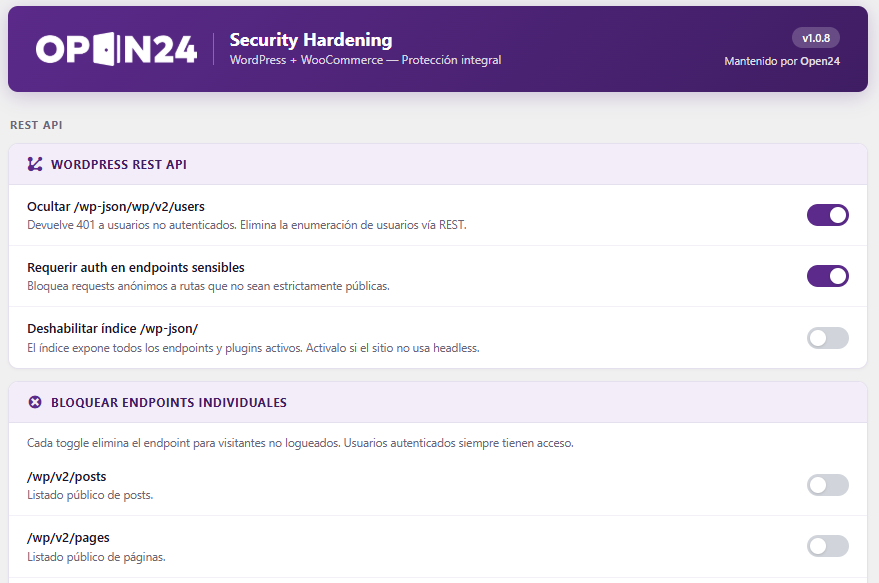
WordPress REST API
- Hide the /wp-json/wp/v2/users endpoint
- Require authentication on sensitive endpoints
- Disable the /wp-json/ index
Login
- Custom login URL (replace wp-login.php with your own slug)
- Limit login attempts per IP address
- Block common usernames such as admin or root
- Hide error hints that reveal whether a username exists
Protocols
- Disable XML-RPC
- Block external access to wp-cron.php
- Block user enumeration via ?author=N
Information disclosure
- Hide the WordPress version from the generator meta tag and RSS feeds
HTTP security headers
- X-Frame-Options, X-Content-Type-Options, Referrer-Policy
- Permissions-Policy, X-XSS-Protection
- Optional HSTS
Administrator accounts
These limit the damage when someone signs in with a valid password, which is how most stores get compromised: stolen or reused credentials. They apply to administrators and WooCommerce shop managers.
- Block the theme and plugin file editor (same effect as DISALLOW_FILE_EDIT, without touching wp-config.php)
- Block installing and uploading plugins and themes, while updates keep working
- Disable application passwords, which sign in through the API and skip the login screen
- Limit how long an administrator session lasts, including sessions that were already open
- Only allow administrators from a list of IPs or ranges. A correct password from any other network gets the same error as a wrong one, and an alert is sent
- Reject leaked passwords for administrator accounts, checked against Have I Been Pwned
- See every open administrator session, with IP and browser, and close them
Alerts and activity log
- Email alerts when an administrator signs in from a new IP or with something that is not a web browser
- Email alerts on sensitive actions: plugins or themes installed, activated, deactivated or deleted, files saved from the admin editor, new administrator accounts or role changes, and changes to these settings
- Activity log of those actions with IP and user agent
File integrity
- Daily check of every WordPress core file against the official checksums, including files that should not be there
- Same check for plugins from wordpress.org
- Change watch for themes, mu-plugins, drop-ins and other plugins, against a snapshot
- Email alert when something does not match, and a button to run the check on demand
Content-Security-Policy
- Configurable CSP for the storefront, in report-only mode first. Reports are collected and shown in the settings screen, so you can build the list of domains the site really uses before enforcing it. Once enforced, a card skimmer cannot send stolen data to a domain that is not on the list.
WooCommerce
- Reject anonymous requests to the /wc/v3/ and /wc/v2/ REST routes
- Hide WooCommerce headers on the storefront
Tools
- Log out all users: rotates the WordPress security keys and salts, which invalidates every session cookie and immediately signs out all logged-in users. Useful after a suspected compromise or when an employee leaves.
- Change log: records which settings were changed and when.
- Settings lock: with
define('O24S_LOCK_SETTINGS', true);in wp-config.php the settings cannot be changed from the admin, so someone who gets into an administrator account cannot switch the protections off from there.
Agency signature
- Adds an Open24 signature in the document head so the site can be identified as maintained by the agency by crawlers such as BuiltWith. This can be turned off.
About the security keys feature
Rotating the WordPress security keys requires updating the corresponding constants in wp-config.php. The plugin does this through the official WP_Filesystem API, writes to a temporary file with restrictive permissions and then moves it over the original in a single atomic operation, preserving the original file permissions. No backup copy is left anywhere on the server, and if any step fails, wp-config.php is left untouched.
If wp-config.php is not writable, the feature reports it and makes no changes.
External services
These features send requests to services outside your site. All of them are off by default.
- Log out all users requests new security keys from the WordPress.org secret key API (
https://api.wordpress.org/secret-key/1.1/salt/) when you press the button. Nothing about your site is sent. WordPress.org privacy policy. - Check WordPress core files requests the official checksums for your WordPress version and language from
https://api.wordpress.org/core/checksums/1.0/once a day. The request contains the WordPress version and locale. WordPress.org privacy policy. - Check plugins from wordpress.org requests the official checksums of each installed plugin version from
https://downloads.wordpress.org/plugin-checksums/. The request contains the plugin folder name and version; results are cached for a week. WordPress.org privacy policy. - Reject leaked passwords sends the first 5 characters of the SHA-1 hash of an administrator’s password to the Have I Been Pwned Pwned Passwords API (
https://api.pwnedpasswords.com/range/) when the password is set, or the first time it is used to sign in. The password and its full hash never leave the site, and the response is padded so its size does not reveal anything either. Have I Been Pwned privacy policy.
The Content-Security-Policy reports are sent by your visitors’ browsers to your own site, not to a third party.
Screenshots
Installation
- Upload the
open24-securityfolder to/wp-content/plugins/, or install the plugin through the WordPress plugins screen. - Activate the plugin through the Plugins menu in WordPress.
- Go to the “Open24 Security” menu to enable the options you need.
All options are disabled by default. Enable them one at a time and test your site after each change, especially the custom login URL and the REST API restrictions.
FAQ
-
Will this break my site?
-
Every option is off by default. The ones that need the most care are the custom login URL and the REST API restrictions, because some themes and plugins rely on those endpoints. Enable them one at a time and check your site afterwards.
-
I enabled the custom login URL and now I am locked out. What do I do?
-
Rename or delete the
open24-securityfolder in/wp-content/plugins/over FTP or your hosting file manager. The plugin will be deactivated and wp-login.php will work again. -
Does this plugin work without WooCommerce?
-
Yes. The WooCommerce options only appear when WooCommerce is active.
-
Does the plugin send data to external services?
-
Only the optional features listed under External services in the Description, and only once you turn them on.
-
I turned on the IP restriction and now I cannot sign in
-
Add
define('O24S_DISABLE_IP_RESTRICTION', true);to wp-config.php, sign in, fix the list and remove the line. The plugin refuses to turn the restriction on if the IP you are saving from is not in the list, but your IP can change afterwards. -
Do the file integrity checks slow down the site?
-
They run once a day through WP-Cron, not on page loads. On a typical store the core and plugin checks take a few seconds.
-
Why are all these options off?
-
Each one changes how the site behaves, and some (the IP restriction, blocking plugin installs, enforcing the Content-Security-Policy) can get in the way of your own work. Turn on what fits the site and test after each change.
-
I am behind Cloudflare and every visitor looks like the same IP
-
Under Login, set “Visitor IP read from” to the header your proxy sets. The screen shows the IP the plugin currently sees for you, so you can confirm the setting is right. Leave it on the direct connection unless there really is a proxy in front of the site: those headers are sent by the client, so trusting them without a proxy lets an attacker send a different IP on every login attempt and never get locked out.
-
Why does logging out all users modify wp-config.php?
-
Because that is where WordPress stores the security keys and salts, as PHP constants. Changing them is what invalidates every session cookie. See the Description for details on how the file is written safely.
Reviews

Contributors & Developers
“Open24 Security” is open source software. The following people have contributed to this plugin.
Contributors
Translate “Open24 Security” into your language.
Interested in development?
Browse the code, check out the SVN repository, or subscribe to the development log by RSS.
Changelog
1.2.0
- Added: administrator account protections. Block the admin file editor, block installing and uploading plugins and themes (updates keep working), disable application passwords, limit how long administrator sessions last, restrict administrators to a list of IPs or CIDR ranges, and reject leaked passwords with Have I Been Pwned. All of them apply to administrators and WooCommerce shop managers.
- Added: email alerts when an administrator signs in from a new IP or with a non-browser user agent, when a correct administrator password is used from a blocked IP, and on sensitive actions: plugin or theme installs, activations, deactivations and deletions, saves from the admin file editor, new administrator accounts, role changes, settings changes and deactivation of this plugin.
- Added: activity log of those actions with IP and user agent. The log now keeps 500 entries and is no longer loaded on every request.
- Added: daily file integrity checks: WordPress core and wordpress.org plugins against their official checksums, and a change watch for themes, mu-plugins, drop-ins and other plugins. Results, an on-demand run and a way to accept legitimate changes are in the settings screen.
- Added: configurable Content-Security-Policy for the storefront, report-only by default, with the browser reports collected in the settings screen.
- Added: Active sessions tool to see and close the open sessions of administrators and shop managers.
- Added:
O24S_LOCK_SETTINGSconstant to lock the settings from wp-config.php, andO24S_DISABLE_IP_RESTRICTIONto get back in after an IP change. - Added filters:
o24s_is_privileged,o24s_admin_ip_allowed,o24s_allow_cron_request. - Every new option is off by default. Nothing changes on existing sites until you turn something on.
1.1.2
- Fixed: “Require auth on sensitive endpoints” could be bypassed. The check looked for allowed routes anywhere in the request URL, query string included, so adding something like
?x=/oembedto a protected/wp/v2/route let an anonymous request through. Requests made with?rest_route=instead of/wp-json/were not checked at all. The plugin now checks the route WordPress actually dispatches, regardless of how it was requested. - Fixed: the same
?rest_route=gap in “Reject anonymous requests to /wc/v3/”. - Fixed: “Block external wp-cron.php” stopped WP-Cron altogether on most hosts. WordPress triggers its own cron with an HTTP request to its public URL, which arrives from the server’s public IP or from Cloudflare, not from 127.0.0.1, so it was being blocked as external. The internal request is now recognised by the one-time lock value WordPress sends with it, which an outside caller cannot know. A system crontab on the same server is also allowed, and the new
o24s_allow_cron_requestfilter covers anything else, such as an external uptime service you trust. - Fixed: with the custom login URL enabled, logging out stopped the request inside
wp_logout. Anyredirect_towas ignored and other plugins hooked towp_logout, such as WooCommerce, did not get to run. Logging out now finishes normally; without an explicit destination it still lands on the home page instead of the blocked login screen. - Changed: an anonymous request that reaches
/wp-admin/while the custom login URL is enabled now gets the same 404 or “Restricted access” response aswp-login.php, instead of a redirect to the custom login slug.
1.1.1
- Fixed: “Hide the WordPress version” no longer strips the
?ver=parameter from script and style URLs. That parameter is how WordPress tells browsers and CDNs to fetch an asset again after it changes; removing it meant an updated theme or plugin could keep serving the old cached file indefinitely. On themes that load webpack chunks the result was a broken front end, because the chunks are requested outsidewp_enqueue_scriptand did arrive updated, leaving a stale bundle trying to resolve new module IDs. The option now only hides the generator meta tag and the version in feeds, which is what its name promises. No action is needed after updating: asset URLs go back to normal on their own. - Fixed: the login attempt limiter could be bypassed. The visitor IP was taken from the
CF-Connecting-IPandX-Forwarded-Forheaders whenever they were present, and those are sent by the client. On a site without a proxy in front, an attacker could send a different IP on every request and never reach the lockout threshold, or send someone else’s IP to get them locked out. The IP is now read from the connection itself, and a new setting under Login lets you pick a proxy header when the site genuinely sits behind Cloudflare, a load balancer or an Nginx proxy. The settings screen shows the IP currently detected for you so you can verify the choice. - Fixed: with the custom login URL enabled, anonymous requests to
admin-post.phpwere redirected to the login slug. That endpoint lives in/wp-admin/but is public by design: it dispatches theadmin_post_nopriv_*actions used by contact forms, payment gateway callbacks and other plugins. Those requests silently turned into a redirect.admin-post.php,admin-ajax.php, WP-Cron and WP-CLI are now excluded from the redirect. - Changed: every option now starts disabled on a new install. Until 1.1.0 a group of them was enabled out of the box, which meant activating the plugin changed how the site behaved before anyone had chosen anything, and made those changes hard to trace when something broke. Existing sites keep exactly the settings they had, including sites that never opened the settings screen.
- Added the
o24s_client_ipfilter for setups whose IP header is not one of the four offered.
1.1.0
- The plugin is now fully translatable. Every user-facing string goes through the WordPress i18n functions with the
open24-securitytext domain. - Source strings are now in English, so the plugin can be translated on translate.wordpress.org.
- Added a complete Spanish (es_ES) translation, plus the
.pottemplate in/languages. - Added the
Domain Pathheader and loading of the bundled translations oninit.
1.0.9
- Security keys are now written through the WP_Filesystem API instead of direct file writes.
- Removed the wp-config.php backup file that was left in the site root. It is no longer created.
- File permissions of wp-config.php are now preserved when rotating keys.
- All admin styles are now properly enqueued instead of being printed inline.
- Hardened input handling: all superglobals are unslashed and sanitized.
- All output is now escaped at the point of output.
- Internal redirects now use wp_safe_redirect().
- Readme and plugin headers translated to English.
1.0.0
- Initial release.