

Description
Royal MCP is a security-first Model Context Protocol (MCP) server for WordPress. It gives AI platforms like Claude, ChatGPT, and Google Gemini structured access to your WordPress content — with authentication, rate limiting, and audit logging that most MCP implementations skip entirely.
According to recent security research, 41% of public MCP servers have no authentication and respond to tool calls without any credentials. Royal MCP takes the opposite approach: every MCP session requires an API key, every request is rate-limited, and every interaction is logged.
Why Security Matters for MCP
MCP gives AI agents the ability to read, create, update, and delete your WordPress content. Without proper authentication, anyone who discovers your MCP endpoint can:
- Read all your posts, pages, and media
- Create or delete content
- Access user data and plugin information
- Overwhelm your server with rapid-fire requests
Royal MCP prevents all of this with API key authentication on session initialization, timing-safe key comparison, per-IP rate limiting (60 requests/minute), and a full activity log of every MCP interaction.
67 Core Tools + 55 Integration Tools
WordPress Core (67 tools):
- Posts — create, read, update, delete, search, count (any registered public post type, featured images supported)
- Pages — full CRUD with parent page support
- Post Types — discover all registered public post types on the site
- Post Revisions — list revision history and roll a post back to any prior version
- Media — browse, upload from URL or base64, update alt text/caption/title/description, set as featured image, delete
- Comments — create, read, delete; full moderation suite (list pending, approve, mark spam, trash)
- Users — display names and roles (emails and usernames are not exposed)
- Categories & Tags & Custom Taxonomies — create, update (rename/re-slug/edit/move), delete, assign, count, discover all registered taxonomies
- Term Meta — read, update, delete (most useful for Yoast / Rank Math / AIOSEO term-level SEO meta)
- Menus — list menus, list menu items, create / update / delete / reorder menu items
- Post Meta — read, update, delete custom fields (works with ACF, MetaBox, JetEngine, Pods, CPT UI)
- SEO Meta — read and write Yoast SEO or Rank Math title/description/focus keyword/robots/OG fields (auto-detects active SEO plugin)
- Site Info — site name, description, WordPress version, timezone
- Plugins & Themes — list installed plugins and themes with active status
- Theme Appearance — get active theme, read/write theme mods (gated by admin toggle + allowlist), read/write Custom CSS
- Search — full-text content search across post types
- Permalink Structure — read and update permalink settings (gated by admin toggle)
- Options — read allowlisted core options, read full plugin settings by slug (sensitive keys redacted), and write to allowlisted options when an admin enables it
Plugin Integrations (Conditional)
Royal MCP automatically detects compatible plugins and adds specialized MCP tools. No configuration needed — if the plugin is active, the tools appear.
WooCommerce Integration (26 tools):
When WooCommerce is active, AI agents can manage your store end-to-end:
- Browse and search products by category, status, or type
- Create and update simple and variable products with prices, SKUs, stock levels
- Manage variable products — list, get, create, update, delete, and batch-update product variations
- Manage global attributes (
pa_*taxonomies) — list registered attributes, list attribute terms, register new attributes, assign attributes to a product as variation axes - Manage coupons — list, search by code, get, create, update, delete (trash or permanent), and bulk-purge trash; supports all standard WC coupon fields (discount type, expiry, usage limits, product/category restrictions, email allowlists)
- View orders, order details, and update order status
- List customers with order count and total spent
- Get store statistics — revenue, order count, average order value by period
GuardPress Integration (7 tools):
When GuardPress is active, AI agents can monitor your site security:
- Get current security score and grade with factor breakdown
- View security statistics — failed logins, blocked IPs, alerts
- Run vulnerability scans and review results
- List blocked IP addresses and failed login attempts
- Browse the security audit log filtered by severity
SiteVault Integration (6 tools):
When SiteVault is active, AI agents can manage your backups:
- List available backups filtered by status or type
- Trigger new backups (full, database, files, plugins, themes)
- Check backup progress in real time
- View backup statistics — total size, last backup, counts
- List and review backup schedules
ForgeCache Integration (3 tools):
When ForgeCache is active, AI agents can manage your page cache:
- Clear the entire cache, or purge a specific URL
- View cache statistics — hit rate, file count, total size
Royal Ledger Integration (4 tools):
When Royal Ledger is active, AI agents can review your software costs and license data:
- List recurring software costs and renewal dates
- Get cost summaries grouped by month, vendor, or category
- List stored license keys (key VALUES are never exposed — only masked previews; decryption requires logging into wp-admin)
Royal Links Integration (3 tools):
When Royal Links is active, AI agents can manage your branded short links:
- List existing links with click counts and target URLs
- Create new branded short links
- Get click statistics for any link
Elementor Integration (6 tools):
When Elementor (free or Pro) is active, AI agents can clone and customize existing Elementor pages without trying to generate page-builder JSON from scratch:
- Clone an existing Elementor page with a new title and fresh element IDs (so the duplicate opens in the editor without ID collisions)
- Bulk-replace text across heading, text-editor, button, image-box, icon-box, icon-list, testimonial, tabs, accordion, toggle, star-rating, call-to-action, and flip-box widgets
- Swap image URLs across image, image-box, background_image, and gallery widget settings
- Get a compact outline of any page (section/container hierarchy, widget types, text snippets) so Claude can reason over a full page in a few KB instead of the raw JSON
- List saved templates from the Elementor template library and import templates from JSON
- Atomic widgets (Elementor 4.0+ Editor V4 elements) pass through opaque — we never decode atomic schemas because Elementor itself may shift them. Widget-level creation from scratch is intentionally out of scope; the design commitment is to work from an existing-known-good source.
Royal MCP and the WordPress Core Abilities API
WordPress 6.9 shipped the Abilities API in November 2025 — a primitive that lets plugins register typed capabilities AI agents can call. Core ships three default abilities (site info, user info, environment info) and the wordpress/mcp-adapter package bridges abilities to the MCP protocol.
Royal MCP is a complete, production-ready MCP server that predates the official adapter. It runs the full Streamable HTTP transport, enforces API key authentication on every request, ships OAuth 2.0 for Claude Desktop’s native connector flow, rate-limits per-IP, redacts sensitive data, and logs every interaction. Out of the box it includes 67 tools for WordPress core operations plus 49 integration tools that auto-load when WooCommerce, GuardPress, SiteVault, ForgeCache, Royal Ledger, or Royal Links is active.
Supported AI Platforms
- Claude (Anthropic) — Full MCP support via Claude Desktop, Claude Code, and VS Code
- OpenAI / ChatGPT — GPT-4o, GPT-4 Turbo, GPT-3.5 Turbo
- Google Gemini — Gemini 1.5 Pro, 1.5 Flash
- Groq — Llama 3.3, Mixtral, Gemma 2
- Azure OpenAI — Azure-hosted OpenAI deployments
- AWS Bedrock — Claude, Llama, Titan models
- Ollama / LM Studio — Local self-hosted models (no external data transmission)
- Custom MCP Servers — Connect to any MCP-compatible endpoint
Compatible Clients & Frameworks
Royal MCP works with any MCP-compliant client, IDE, or AI agent framework — no per-tool configuration required:
- Desktop AI apps — Claude Desktop (native MCP connector via OAuth 2.0), ChatGPT Desktop, Gemini Advanced.
- AI code IDEs — Claude Code, VS Code (with MCP extension), Cursor, Windsurf, Continue, Cline, Zed, JetBrains AI Assistant.
- API testing tools — Postman, Bruno, Insomnia (use the API key in the
X-Royal-MCP-API-Keyheader). - Custom field plugins — Advanced Custom Fields (ACF), MetaBox, JetEngine, Pods, CPT UI, Custom Field Suite. The
wp_get_post_meta/wp_update_post_metatools read and write any custom field, so AI agents can populate ACF fields just like a human editor. - Page builders — Elementor has dedicated tools for clone-and-customize workflows (clone a page, find/replace text, swap images, get an outline, import templates) — see the Tools list. Widget-level creation from scratch is intentionally out of scope. Divi, Beaver Builder, Bricks, Gutenberg, Spectra, and Stackable store standard post content that is readable and writable by AI; page-builder-specific JSON storage is opaque unless covered by a dedicated tool.
- Multilingual — WPML, Polylang, TranslatePress, qTranslate. Translated posts appear as separate posts and can be read or written via the standard post tools.
- AI agent frameworks — LangChain, AutoGen, CrewAI, LlamaIndex, Haystack — any MCP-compatible framework can call Royal MCP’s tools.
- AI app platforms — Anthropic Console, OpenAI Playground, Google AI Studio, Vertex AI, Azure AI Studio, Amazon Bedrock Console.
MCP Spec Compliance
Royal MCP implements the MCP 2025-11-25 Streamable HTTP transport specification:
- Single
/mcpendpoint for all JSON-RPC communication - POST for client messages, GET for server-sent events, DELETE for session termination
- Cryptographically secure session IDs with transient-based storage
- Origin header validation to prevent DNS rebinding attacks
- Proper CORS handling for browser-based MCP clients
External Services
This plugin connects to third-party AI services to enable AI platforms to interact with your WordPress content. No data is transmitted until you explicitly configure and enable a platform connection.
What data is sent: Your WordPress content (posts, pages, media metadata) as requested by the connected AI platform through authenticated MCP tool calls.
When data is sent: Only when you have configured a platform with API credentials AND enabled that platform connection AND the AI platform makes an authenticated request.
Supported services and their policies:
-
Anthropic Claude — Used for Claude AI integration
Terms of Service | Privacy Policy -
OpenAI — Used for ChatGPT/GPT-4 integration
Terms of Use | Privacy Policy -
Google Gemini — Used for Gemini AI integration
Terms of Service | Privacy Policy -
Groq — Used for Groq LPU inference
Terms of Service | Privacy Policy -
Microsoft Azure OpenAI — Used for Azure-hosted OpenAI models
Terms of Service | Privacy Policy -
AWS Bedrock — Used for AWS-hosted AI models
Terms of Service | Privacy Policy -
Ollama / LM Studio — Local self-hosted models (no external data transmission)
-
Custom MCP Servers — User-configured servers (data sent to user-specified endpoints only)
Screenshots
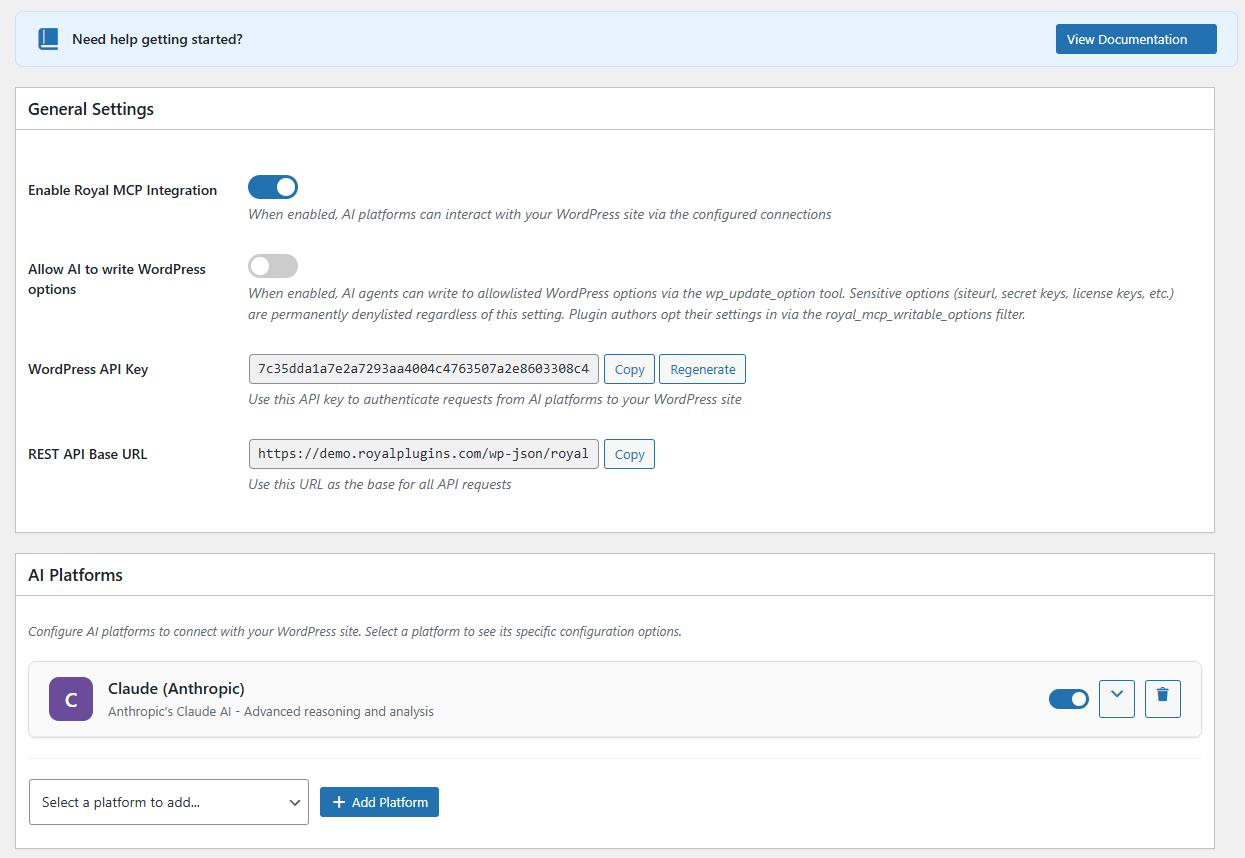
Main settings page with API key and platform overview 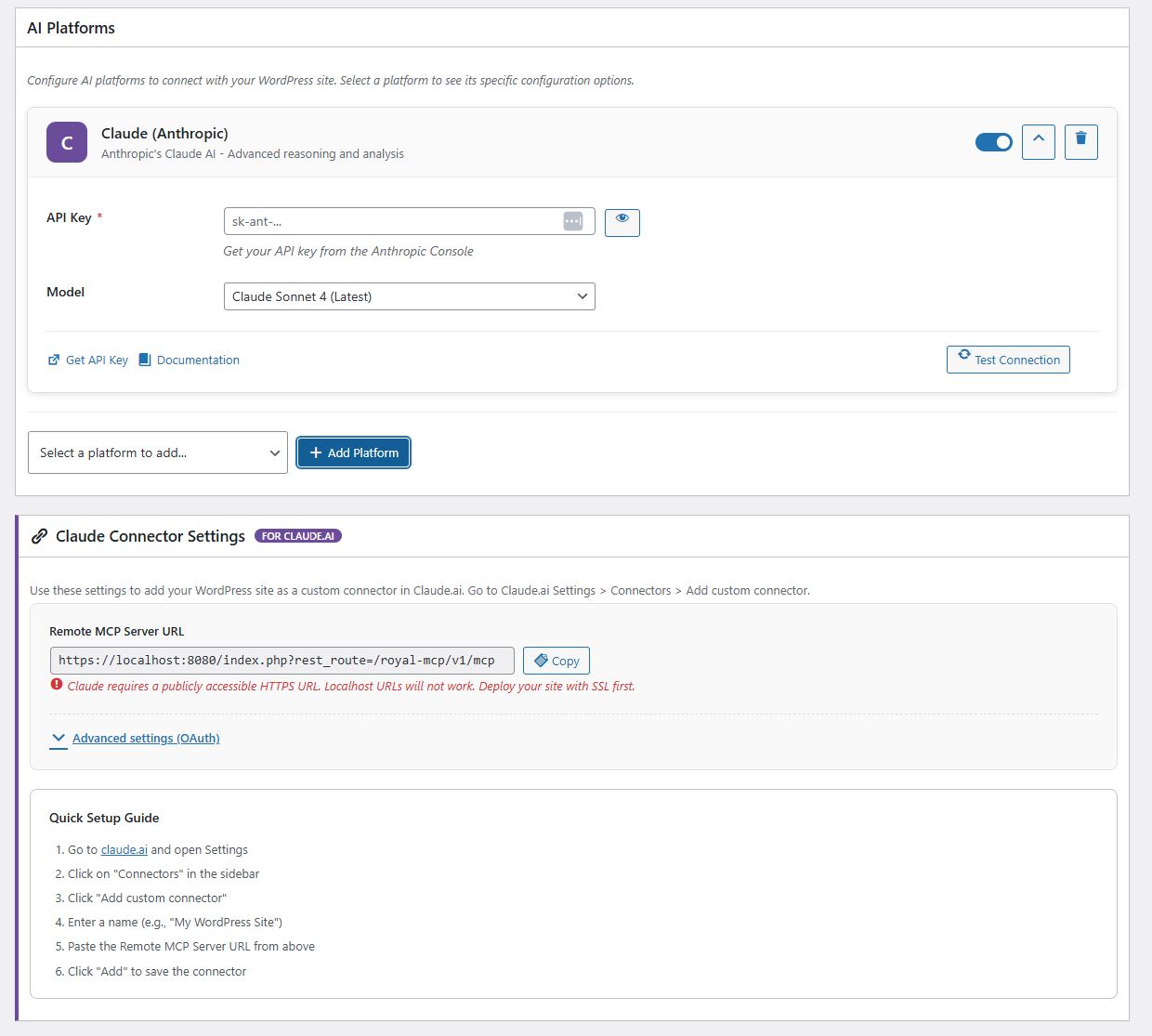
AI platform configuration with connection testing 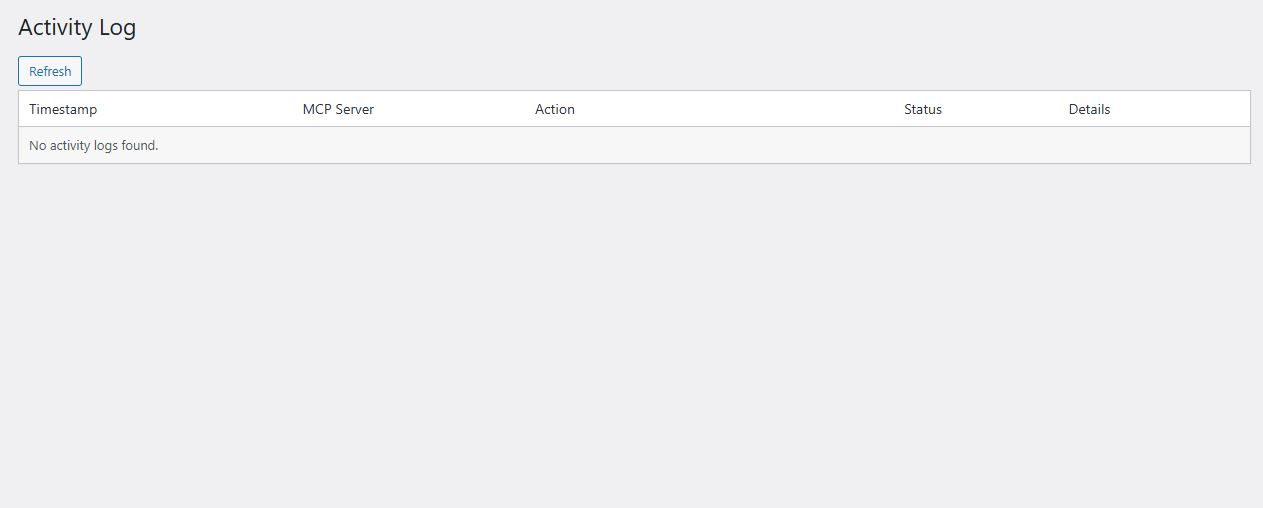
Activity log showing authenticated MCP requests 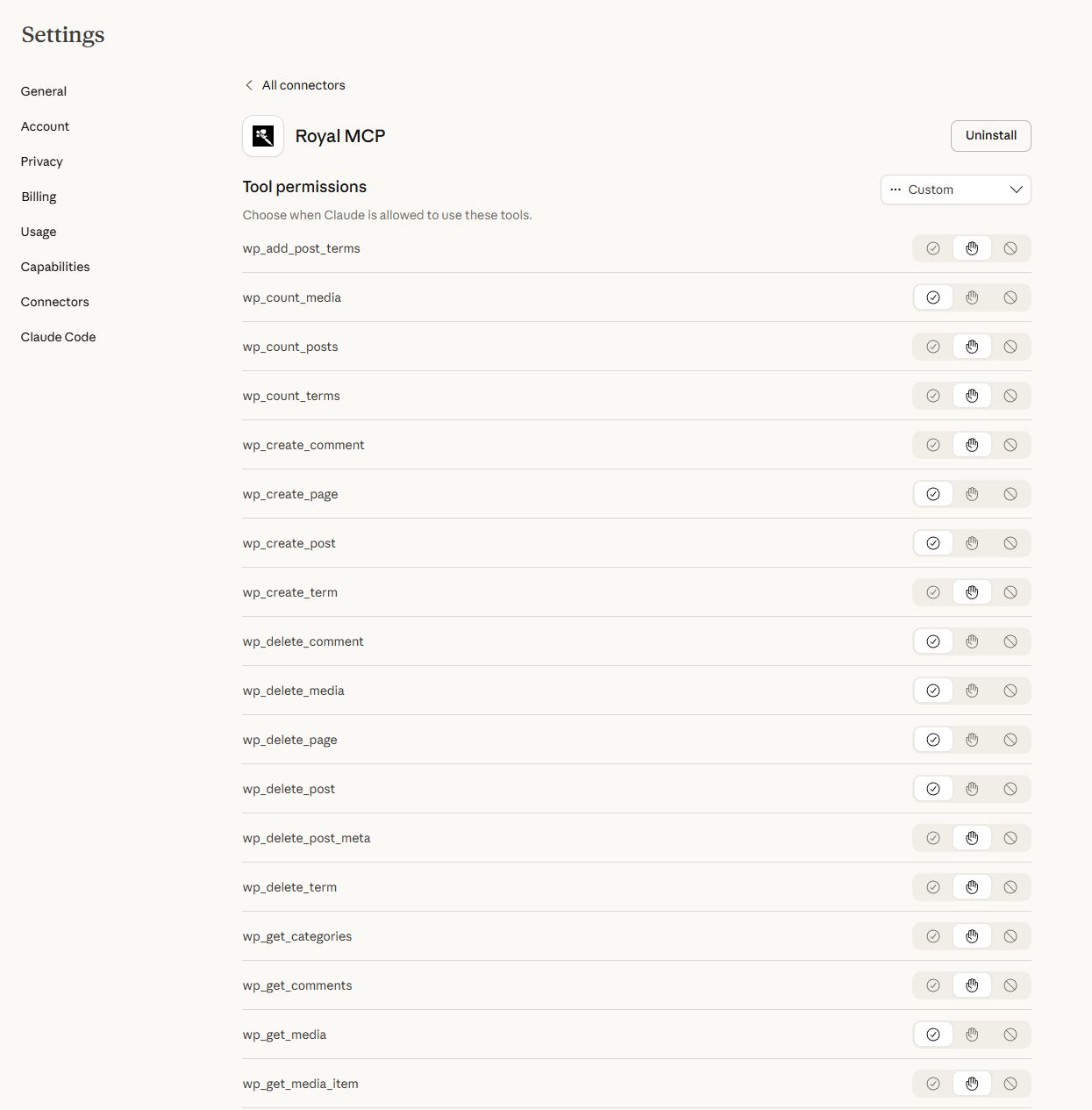
Claude Desktop MCP connector setup 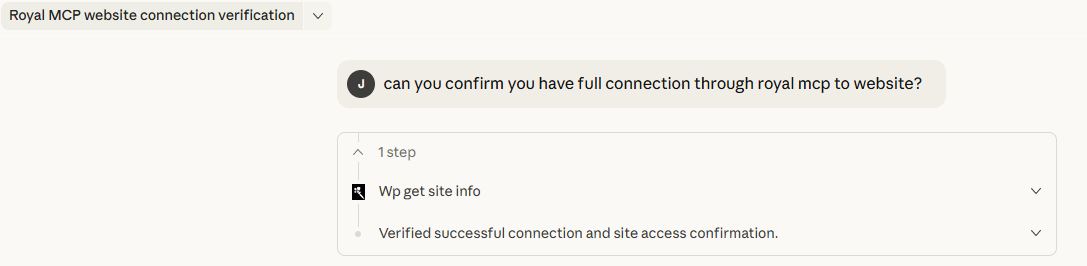
WooCommerce product management via Claude 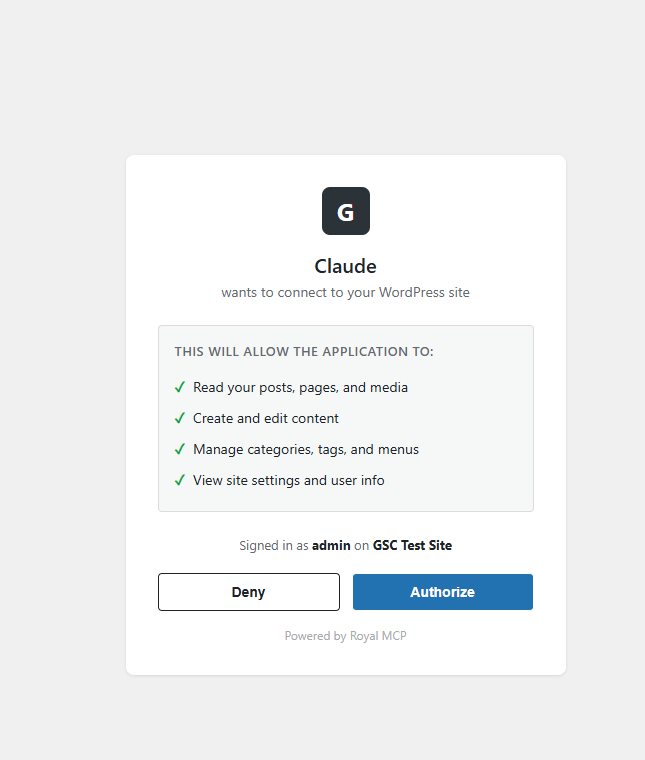
OAuth consent screen for Claude Desktop connector
Installation
- Upload the
royal-mcpfolder to/wp-content/plugins/ - Activate the plugin through the ‘Plugins’ menu in WordPress
- Go to Royal MCP Settings to configure
- Copy your API key — you will need this to authenticate MCP connections
- Add your AI platform(s) and enter their API keys
- In your AI client (Claude Desktop, VS Code, etc.), configure the MCP server URL and API key
Full setup guides for each platform are available at royalplugins.com/support/royal-mcp/.
FAQ
-
What is MCP and why does my WordPress site need it?
-
Model Context Protocol (MCP) is an open standard created by Anthropic that lets AI assistants interact with external data sources. Without MCP, AI tools like Claude or ChatGPT can only work with content you copy and paste into them. With Royal MCP installed, these AI platforms can directly read your WordPress posts, create new content, manage your WooCommerce products, check your security status, and trigger backups — all through a structured, authenticated protocol.
-
How is Royal MCP different from other WordPress MCP plugins?
-
Security. Most MCP plugins — and 41% of all public MCP servers — have no authentication at all. Royal MCP requires an API key for every session, rate-limits requests to prevent abuse, logs every interaction for audit purposes, and filters sensitive data (emails, PHP version, admin credentials) from responses. We built this plugin with the same security standards we apply to GuardPress, our WordPress security plugin used on thousands of sites.
-
Does Royal MCP duplicate what WordPress core now does?
-
No. WordPress 6.9 added the Abilities API — a primitive for registering AI-callable functions — and the
wordpress/mcp-adapterpackage bridges abilities to the MCP protocol. Royal MCP is a full MCP server with the security layer, connector flows, and plugin integrations that the bare primitive does not include: enforced API key auth, OAuth 2.0 for Claude Desktop, per-IP rate limiting, audit logging, sensitive-data redaction, 67 ready-to-use WordPress core tools, and 49 integration tools that auto-load for WooCommerce, GuardPress, SiteVault, ForgeCache, Royal Ledger, and Royal Links. -
Does Royal MCP work with WooCommerce?
-
Yes. When WooCommerce is active, Royal MCP automatically adds 26 MCP tools spanning product management (simple and variable, including variation CRUD and global attribute management), full coupon management (list/get/create/update/delete + bulk trash purge), order management (view, update status), customer data, and store statistics. No additional configuration is needed — the tools appear automatically in the MCP tools list.
-
Can AI assistants configure my plugins for me?
-
Yes, with safety controls. Royal MCP exposes two tools for plugin configuration:
-
wp_get_plugin_settingslets AI read any plugin’s stored settings by slug. Sensitive values (API keys, secrets, tokens, passwords, license keys, OAuth credentials) are automatically replaced with[REDACTED]before they leave your server, so AI assistants can understand a plugin’s configuration without ever seeing stored credentials. -
wp_update_optionlets AI write to WordPress options, but only after passing three security gates:- The site admin must enable the “Allow AI to write WordPress options” toggle on the Royal MCP settings page (off by default)
- The option name must be in a runtime allowlist. The default allowlist is intentionally tiny —
blogname,blogdescription,posts_per_page,date_format,time_format. Plugin authors opt their own settings in via theroyal_mcp_writable_optionsfilter. - A hard denylist permanently blocks writes to sensitive option names (siteurl, home, license keys, secrets, salts, etc.) regardless of the allowlist or the toggle.
Plugin authors can opt in their settings with one line:
add_filter('royal_mcp_writable_options', fn($opts) => array_merge($opts, ['my_plugin_settings'])); -
-
How do I connect Claude Desktop to WordPress?
-
Install Royal MCP, go to Royal MCP Settings, and copy your API key and MCP server URL. In Claude Desktop, add a new MCP server configuration with the URL and include the
X-Royal-MCP-API-Keyheader with your API key. Full step-by-step guide at royalplugins.com/support/royal-mcp/. If the connection fails, see the next FAQ. -
The connector won’t connect — where do I start?
-
About 90% of “can’t connect” / “OAuth failed” / “tools missing” issues resolve in a basic 4-step pass before any host-specific fix is needed. In order: (1) update Royal MCP to the latest version (every recent release fixes meaningful OAuth edge cases), (2) run a conflict test — deactivate all other plugins, switch to a default theme like Twenty Twenty-Five, and purge every cache layer (any cache plugin, your host’s server-level cache, Cloudflare/CDN, and browser cache), (3) wipe stale OAuth state — use the Reset OAuth State button in Royal MCP Settings if you’re on 1.4.17 or newer, or run the four
DELETESQL queries documented in our support article, (4) check Royal MCP Activity Logs for the most recentoauth:row, which records exactly which validation rule fired. Full walk-through with copy-pasteable commands at royalplugins.com/support/royal-mcp/troubleshooting-start-here.html. Only proceed to host-specific fixes (Cloudflare AI Bots toggle, SiteGround/.well-known/static files, edge-cache exclusions) after the four basics are ruled out — most “advanced infrastructure” tickets we receive actually resolve in those four steps. -
I restored my WordPress database from backup and Claude can’t reconnect. How do I fix this?
-
When you restore from backup, the OAuth client credentials Claude was holding no longer match anything on the WordPress side, so Claude’s connector ends up with a stale token that no Royal MCP installation will accept. The fix in Royal MCP 1.4.17+ is one click: go to Royal MCP Settings and click the Reset OAuth State button. This wipes all stale OAuth clients, issued access/refresh tokens, and pending authorization codes. Then in Claude, delete the existing connector entirely, wait 30 seconds, and re-add it from scratch — the full OAuth flow runs fresh against the cleaned-up state and the connection works. On 1.4.16 or older the same effect can be achieved by running four
DELETESQL queries documented at royalplugins.com/support/royal-mcp/troubleshooting-start-here.html. The plugin’s settings, API key, and Activity Log are not affected by Reset OAuth State — only the OAuth handshake state. -
I’m auditing my install and can’t find the OAuth endpoints under `/wp-json/royal-mcp/v1/`. Where are they?
-
By design, Royal MCP’s OAuth endpoints (
/register,/token,/authorize) are registered as top-level WordPress rewrite rules at the site root, not as REST API routes under/wp-json/royal-mcp/v1/. This is required by the OAuth 2.0 specification (RFC 6749) and the MCP discovery specs (RFC 8414 and RFC 9728), which mandate predictable site-root paths so OAuth-discovery-aware clients can find them without per-plugin configuration. If you’re auditing rewrite rules instead of REST routes, you can see ours viawp rewrite list | grep royal_mcp_oauthfrom WP-CLI. The/wp-json/royal-mcp/v1/namespace contains the JSON-RPC tool endpoint at/mcpplus supporting REST routes (/posts,/pages,/site, etc.) — but not the OAuth handshake endpoints themselves. Both routing layers are normal and both need to be reachable for the connector to work end-to-end. -
Is my content safe?
-
Royal MCP is designed with defense in depth. API key authentication is required for all MCP sessions. Rate limiting prevents abuse (60 requests per minute per IP). Activity logging records every tool call. Sensitive data is filtered — user emails, usernames, admin email, PHP version, and stored credentials inside plugin settings (api keys, secrets, tokens, passwords) are never exposed through MCP. Comment creation respects your WordPress moderation settings. Post meta values are sanitized before storage. Option writes are disabled by default and gated by three independent checks (admin toggle, allowlist, hard denylist) when enabled. The plugin itself starts disabled by default — nothing is accessible until you explicitly enable it.
-
Can I use local AI models instead of cloud services?
-
Yes. Royal MCP supports Ollama and LM Studio for fully local AI inference. When using local models, no data leaves your server — the AI model runs on your own hardware and communicates with WordPress through the MCP protocol on localhost.
-
What happens if I uninstall Royal MCP?
-
Royal MCP performs a clean uninstall. All plugin options, database tables (activity logs), transients, and user meta are removed. No orphaned data is left behind.
-
Does Royal MCP work with Claude Code, VS Code, Cursor, Windsurf, or other AI IDEs?
-
Yes. Any MCP-compliant client can connect to Royal MCP. Configure your IDE or client with the MCP server URL (
https://yoursite.com/wp-json/royal-mcp/v1/mcp) and the API key (sent in theX-Royal-MCP-API-Keyheader). Claude Desktop additionally supports the native “Add Connector” OAuth 2.0 flow, which Royal MCP handles via Dynamic Client Registration (RFC 7591) — no manual API key management required on that path. The same OAuth flow works in any client that follows the MCP 2025-11-25 spec. -
Does Royal MCP work with custom fields, ACF, MetaBox, JetEngine, Pods, or CPT UI?
-
Yes. Royal MCP exposes WordPress’s standard
wp_get_post_meta,wp_update_post_meta, andwp_delete_post_metatools, which read and write any custom field — including Advanced Custom Fields (ACF), MetaBox, JetEngine, Pods, CPT UI, and Custom Field Suite. AI agents can populate ACF fields, set repeater rows, update flexible content blocks, and read computed fields just like a human editor working in the WordPress admin. -
Will Royal MCP slow down my WordPress site?
-
No. The MCP endpoint is a REST route that runs only when an authenticated AI client makes a request — it does not run on visitor-facing pages, frontend templates, or admin screens (except its own settings page). The activity log uses a single indexed database table and writes asynchronously after the response is sent. Rate limiting (60 requests/minute per IP) prevents accidental overload.
-
Does Royal MCP work on WordPress multisite networks?
-
Yes, on a per-site basis. Each site in a multisite network has its own API key, its own activity log, and its own settings. AI clients connect to a specific site’s MCP endpoint — Royal MCP does not bridge requests between sites in the network.
-
Can I limit which posts, pages, or post types AI can access?
-
Yes. The
wp_get_postsandwp_create_posttools accept apost_typeparameter and validate it against registered public post types, so private or internal post types are not exposed. Plugin authors can disable specific tools entirely with theroyal_mcp_disabled_toolsfilter, or scope the option-write allowlist withroyal_mcp_writable_options. WordPress’s standard capability checks also apply to every tool call. -
Does Royal MCP work with WPML, Polylang, or TranslatePress for multilingual content?
-
Yes. Translated posts appear as separate WordPress posts (each with its own ID and language meta) and are readable or writable via the standard
wp_get_posts,wp_create_post, andwp_update_posttools. AI agents can list posts in a specific language by filtering on the language meta key, or translate a post and write the corresponding translation by ID. -
How do I monitor what AI is doing on my site?
-
Every authenticated MCP request is logged to the Royal MCP activity log with timestamp, client IP, tool name, parameters (sensitive values redacted), and response status. The log is filterable by time range, client, tool, or status code, and exportable to CSV. The log page refreshes via AJAX so you can watch active sessions in real time.
Reviews


Contributors & Developers
“Royal MCP – Secure AI Connector for Claude, ChatGPT & Gemini” is open source software. The following people have contributed to this plugin.
Contributors
Translate “Royal MCP – Secure AI Connector for Claude, ChatGPT & Gemini” into your language.
Interested in development?
Browse the code, check out the SVN repository, or subscribe to the development log by RSS.
Changelog
1.4.22
- Fix: AI Platforms Test Connection on the Claude platform now uses the model selected in the dropdown and the underlying test ping points at a model Anthropic still serves. Pre-1.4.22 the Test Connection button had two compounding defects in
Platform\Registry.php: thetest_body.modelwas hardcoded toclaude-3-5-haiku-20241022regardless of the dropdown selection, AND that model has since been deprecated by Anthropic — so every click of Test Connection returnedServer responded with status 404: model: claude-3-5-haiku-20241022no matter which model was chosen or whether the API key was valid. The dropdown is also refreshed to the current Claude lineup (Opus 4.7, Sonnet 4.6, Haiku 4.5) and the Gemini dropdown adds the 2.x family entries. Reported by two customers within four days; affects every Royal MCP install using the AI Platforms feature with a Claude key. - Fix: Manually-configured OAuth Client ID and Client Secret in Claude Connector Settings Advanced settings can now be cleared through the UI. Pre-1.4.22 the sanitize callback treated an empty submission as “preserve previous value” (defense against accidental blanking), which left customers no way to switch from manual-credential mode back to Dynamic Client Registration once a static client had been generated. A new Clear button appears next to each field when populated; it AJAX-clears the stored value and the connector falls back to Dynamic Client Registration on the next handshake. The existing Reset OAuth State button (1.4.17) is also extended to wipe these manual credentials in addition to clients/tokens/auth codes, with a success message that confirms when it happened.
- Fix: OAuth root rewrite rules (
/authorize,/token,/register,/.well-known/oauth-authorization-server) now match both bare and trailing-slash variants. Pre-1.4.22 the rules used a bare$regex anchor that didn’t match the trailing-slash form WordPress canonical_redirect adds on default permalink structures — the trailing-slash URL fell through to standard WP page lookup and could be hijacked by membership plugins or theme templates that serve their own page for any non-matching URL. Discovery clients then received HTML at 200 instead of JSON metadata and silently failed. Widening to/?$matches both forms; the bare-path variants continue to work. - New: Admin notice detects when your web server returns a 301 trailing-slash redirect on POST
/register— a host-side config issue (Nginxmod_dir, Apachemod_dir, or.htaccesscanonicalization) that breaks OAuth registration because clients don’t follow 301 on POST. The notice surfaces the issue and links to a support article with Nginx and Apache fixes. Cached in a 12-hour transient and skipped on dev hosts and multisite subsites, matching the existing self-check pattern. Self-check probes are short-circuited inside the OAuth dispatcher so they don’t generate Activity Log noise. - New: The existing
.well-known/self-check (1.4.14, 1.4.19) now also detects when the discovery endpoint returns an HTML body at status 200 — a membership plugin (ARMember, MemberPress, Restrict Content Pro) or theme template is intercepting the request and serving its own login or access-denied page instead of letting Royal MCP’s JSON response through. Surfaces a notice with the most common fixes (add OAuth paths to the plugin’s unrestricted-URL list, re-save Permalinks, deactivate suspects).
1.4.21
- Fix: Gutenberg block content created or updated via
wp_create_page,wp_update_page,wp_create_post, andwp_update_postis no longer mangled in the block’s JSON comment. Two compounding bugs surfaced on WordPress 7.0’s new per-block Custom CSS feature, where a block like<!-- wp:table {"style":{"css":"a\nb\n& table { color: red; }"}} -->round-tripped asau005cnbu005cnu005cu0026 table { color: red; }, breaking the block’s render and triggering Gutenberg’s “unexpected content” warning. (1) Pre-1.4.21 the tools ranwp_kses_post()on the caller’s content before handing it towp_insert_post(), which HTML-encoded the block delimiters. The fix removes that pre-filter and trusts WordPress’s owncontent_save_prefilter insidewp_insert_post(), which applieswp_filter_post_ksesbased on the calling user’sunfiltered_htmlcapability — the same code path the block editor itself uses when admins save block content. (2)wp_insert_post()runswp_unslash()on its arguments internally per the WordPress slashing convention, which was stripping the literal backslashes inside escape sequences (\n,&) that block JSON depends on. The fixwp_slash()es the content before passing, so the internalwp_unslashleaves the original input intact. Round-trip is now byte-for-byte preserved on both WordPress 6.x and 7.0. Reported by @danielkleinert in royalplugins/royal-mcp#15.
1.4.20
- Fix: WooCommerce order tools no longer hang when a
shop_order_refundrecord appears in the result set. With HPOS (High-Performance Order Storage) enabled, WooCommerce stores both real orders and refund child records in the samewc_orderstable, andwc_get_orders()returned both unless explicitly filtered. Theformat_order_summary()andformat_order_detail()formatters expect aWC_Orderand choke when handed aWC_Order_Refund, producing an indefinite hang that surfaced to MCP clients as error -32001 (timeout). Fixed in all four call sites inincludes/Integrations/WooCommerce.php: thewc_get_ordersandget_store_statsqueries now include'type' => 'shop_order'; thewc_get_orderandwc_update_order_statushandlers now reject inputs that don’t resolve to aWC_Orderinstance (catching refund IDs becauseWC_Order_RefundextendsWC_Abstract_Order, notWC_Order). Only affects HPOS-enabled stores — pre-HPOS,shop_order_refundlives inwp_postsas a distinct post_type and is never returned bywc_get_orders(). Thanks to @ober37 for the diagnosis and the PR (royalplugins/royal-mcp#20, #21).
1.4.19
- New: Six Elementor tools for clone-and-customize workflows:
elementor_clone_pageduplicates an existing Elementor page with fresh element IDs and draft status;elementor_replace_textdoes bulk text substitution across heading, text-editor, button, image-box, icon-box, icon-list, testimonial, tabs, accordion, toggle, star-rating, call-to-action, and flip-box widgets;elementor_replace_imageswaps image URLs across image, image-box, background_image, and gallery widget settings;elementor_get_page_outlineextracts a compact section/container hierarchy with widget types and text snippets (typically under 2KB so Claude can reason over a full page without burning the JSON budget);elementor_list_local_templatesenumerates entries in the Elementor template library;elementor_import_templatewraps the official\Elementor\TemplateLibrary\Source_Local::import_template()API. All six tools auto-register when Elementor is active and are hidden otherwise. Atomic widgets (Elementor 4.0+ Editor V4 elements) pass through opaque — we never decode atomic schemas because Elementor itself may shift them. Widget-level creation from scratch is intentionally out of scope; the design commitment is to never generate Elementor JSON from a blank slate and to always work from an existing-known-good source. Capability-gated (edit_postsplusedit_postper-post). Tested end-to-end against a real Elementor Pro 4.0.4 page with 74 widgets and 9 top-level containers. - New: Admin notice now detects stale static
.well-known/oauth-authorization-serverfiles left in the webroot from a pre-1.4.0-era host-support workaround. The smoking gun: the static file’s metadata advertises OAuth endpoints under/wp-json/royal-mcp/v1/authorize(the old REST-namespace paths) instead of the current root paths (/authorize,/token,/register). Claude.ai reads the stale metadata, follows the bad URLs to 404, and the connection silently fails. The notice surfaces the file paths and the SSH/SFTP delete command, with a per-user dismiss. Detection is cached in a 12-hour transient and skipped on dev hosts and multisite subsites, same pattern as the existing host-blocked detection. Triggered by a customer support ticket where the connection looked working from a curl probe but Claude.ai connector consistently failed; root cause was a leftover file from host support six months earlier. The existing host-blocked detection (404 on/.well-known/) is unchanged. - Doc: Readme “Page builders” line softened. Previous text (“Post content stored by builders is fully readable and writable by AI”) implied a flat statement of universal coverage that wasn’t accurate for Elementor’s JSON-storage model. New text describes Elementor’s clone-and-customize tools explicitly and clarifies that page-builder-specific JSON storage is opaque to AI unless covered by a dedicated tool. Divi/Beaver Builder/Bricks/Gutenberg/Spectra/Stackable handling is unchanged — their standard post content remains AI-readable via the existing post tools.
1.4.18
- Fix: The
/wp-json/royal-mcp/v1/mcpGET handler is now User-Agent-aware. Anthropic’s post-OAuth session-establishment probe (User-Agent:Claude-User) now receives HTTP 200 +Content-Type: text/event-streamwith a minimal keepalive comment, satisfying the spec-compliant session start. Other authenticated GET requests (mcp-remote, custom scripts) continue to receive 405 withAllow: POST, DELETE, OPTIONSto preserve the 1.4.12 fix that stopped mcp-remote’s retry-storm pattern. Without this differentiation, customers updating to 1.4.17 would see the auth-code DB-table fix succeed at/tokenbut Anthropic’s subsequent GET probe receive 405 four times before giving up — same connector-failure symptom they had on 1.4.16, just with a different cause. This is the 4th iteration of the/mcpendpoint response-code matrix and the discrimination layer is documented in_internal/royal-mcp/MCP_ENDPOINT_BEHAVIOR_MATRIX.md. - Fix:
wp_update_menu_itemandwp_reorder_menu_itemsno longer destroy non-empty existing fields. Pre-1.4.18 these tools passed partial args to WordPress’swp_update_nav_menu_item(), which merges any unspecified fields with empty defaults — effectively wiping titles, URLs, parent_id, and target on every item touched. Reported in royalplugins/royal-mcp issue #14: a 96-item menu reduced to flat, blank custom links across all items, requiring ~170 API calls to rebuild. The fix is a read-merge-write pattern in a new internal helper that reads existing item values viawp_setup_nav_menu_item()and merges with caller-supplied overrides before writing. A destructive-operation guardrail also refuses explicit-empty values fortitleorurlthat would zero a non-empty existing value (usewp_delete_menu_item+wp_create_menu_itemto clear those intentionally).wp_reorder_menu_itemsadditionally returns askippedarray when individual items can’t be safely reordered (e.g. missing or recently deleted) instead of silently failing. - Doc: New FAQ entry covering DB-restore recovery via the Reset OAuth State button (closes issue #12). After restoring WordPress from backup, the OAuth client credentials Claude was holding become stale and no Royal MCP install will accept them — one-click recovery via Royal MCP Settings Reset OAuth State (1.4.17+) wipes all OAuth state without affecting the plugin’s settings, API key, or Activity Log.
- Doc: New FAQ entry clarifying that OAuth endpoints (
/register,/token,/authorize) are top-level WordPress rewrite rules at the site root, not REST API routes under/wp-json/royal-mcp/v1/. Customers auditing their install via the REST namespace were confused into thinking the OAuth endpoints weren’t registered; this is by design per the OAuth 2.0 (RFC 6749) and MCP discovery (RFC 8414, RFC 9728) specs which mandate predictable site-root paths. - Doc: New FAQ entry “The connector won’t connect — where do I start?” links to a new troubleshooting-start-here support article. About 90% of “can’t connect” issues resolve in a 4-step basic checklist (update, conflict test, OAuth state wipe, Activity Log check) before any host-specific fix is needed; surfacing this in the readme front-loads the basic workflow that pre-1.4.18 was buried under the advanced support articles.
1.4.17
- Fix: Authorization codes (the short-lived single-use secret exchanged at the OAuth
/tokenstep) are now stored in a dedicatedwp_royal_mcp_oauth_auth_codesdatabase table with atomic single-row consume, replacing the previous WordPress-transient storage. On host stacks running multiple object-cache layers (LiteSpeed Cache + SpeedyCache confirmed as a reproducer), the transient backend was silently evicting the auth code in the ~2-second window between/authorizeand/token, breaking the OAuth handshake withinvalid_grant: Authorization code is invalid, expired, or already used.even on a fully clean test. The new storage layer is unaffected by object-cache eviction since reads and writes go directly to the database. The schema migration runs automatically onplugins_loadedfor existing installs (no manual reactivation required). - New: “Reset OAuth State” admin button on the Royal MCP settings page. One click wipes all registered OAuth clients, issued access/refresh tokens, and pending authorization codes — recovering from stuck handshakes without dropping to wp-cli or SQL. All currently-connected MCP clients will need to re-authorize after running this. The plugin’s settings, API key, and Activity Log are not affected. The reset action is recorded in Activity Logs (action
oauth:reset) for audit. Capability-gated tomanage_options; nonce-protected; confirmation modal before destructive action. - New: MCP
tools/callrequests now write a structured entry to Royal MCP > Activity Logs on every invocation (actiontools/call:<tool_name>). Pre-1.4.17, OAuth-connected sessions running tool calls through the modern/wp-json/royal-mcp/v1/mcpendpoint produced zero log entries even when fully working, which led customers to misdiagnose a working connection as broken. Logged metadata is intentionally minimal — tool name and the keys of the argument array, but never the argument values, since tool args can contain arbitrary customer data (post content, search queries, etc.). Errors thrown by tool dispatchers are captured with their message. - Fix: Activity Log “View Details” modal was rendering both Request Data and Response Data panels as the string
[object Object]instead of the actual JSON payload. Root cause: the click handler was reading the JSON-encoded data attributes via jQuery’s.data()helper, which auto-parses JSON-looking values into JavaScript objects — andJSON.parse(object)then threw, falling through to a catch that displayed the toString() of the object. Switched to.attr('data-request')/.attr('data-response')which return the raw attribute string, so the formatter sees actual JSON. Pre-existing bug; only became user-visible in 1.4.17 because the new OAuth and tool-call entries surface the View Details panel as the primary diagnostic surface. - Fix: Plugin admin CSS and JS now use
ROYAL_MCP_VERSION . filemtime($file)as the cache-busting version string, instead ofROYAL_MCP_VERSIONalone. On Cloudflare-fronted installs (and similar CDN configurations), plugin assets are cached withCache-Control: immutable, max-age=2592000— meaning an intra-version patch toadmin.jsoradmin.csswas being served stale for up to 30 days because the?ver=X.Y.Zquery string was unchanged. Appendingfilemtime()makes the URL change on every file modification, forcing browsers and CDNs to fetch fresh. Affects only the admin-side assets; REST/MCP endpoints are unaffected.
1.4.16
- New: OAuth flow now writes a structured error entry to Royal MCP > Activity Logs every time a
/token,/register, or/authorizerequest fails. Pre-1.4.16 every OAuth failure exited silently — noerror_log(), no Activity Log entry, no admin-visible trace. Customers and support had to enableWP_DEBUG_LOGand patch the plugin source to surface the failing validation rule (PKCE mismatch, redirect_uri mismatch, expired code, unknown client_id, CSRF nonce failure, etc.). Each entry now records the OAuth error code, our error description, HTTP status, request URI, IP, User-Agent, and the publicclient_id/grant_type/response_typewhen present. Auth codes, PKCE verifiers, client secrets, refresh tokens, and access tokens are explicitly excluded from the log payload.
1.4.15
- Fix: API key Regenerate button on the settings page is no longer silently overridden. Pre-1.4.15 the form submitted the existing readonly
api_keyfield value alongside the regenerate flag, and the sanitize callback checkedapi_keybeforeregenerate_api_key— so clicking Regenerate did nothing, customers kept the same key indefinitely, and any “I rotated my key” troubleshooting step was a no-op. Sanitize order is flipped:regenerate_api_keyis now checked first, thenapi_key, then the fallback. Resolves a customer-reported key rotation failure on SiteGround. - Fix: Newly generated API keys now use 32-character lowercase hex (
bin2hex(random_bytes(16))) instead of 32-character mixed-case alphanumeric (wp_generate_password(32, false)). Mixed-case keys produced visually-ambiguous characters in monospace admin fonts (uppercase O vs digit 0, uppercase I vs lowercase l vs digit 1, lowercase o vs digit 0) — customers transcribing keys into Claude Desktop / mcp-remote configs by hand would silently flip a character at the visually-identical position and hit “Invalid API key” with no obvious cause. Hex eliminates the ambiguity. Existing keys keep working — only newly-regenerated keys use the new format. Same entropy (128 bits) as before. - Fix: MCP sessions now use a sliding 24-hour TTL with refresh-on-access instead of a fixed 1-hour TTL. Pre-1.4.15 sessions died exactly 60 minutes after creation regardless of activity; Claude Desktop’s auto-reconnect on session loss spawned multiple competing
mcp-remotenpx processes (“Session not found or expired” followed by a rapid reinitialization loop). Active sessions now live until 24 hours of true idle. Eliminates the thundering-herd reconnect pattern customers were seeing. - Fix: All responses under the
/wp-json/royal-mcp/*REST namespace now sendCache-Control: no-store, no-cache, must-revalidate, privateandPragma: no-cacheon EVERY response — including the MCP endpoint, the/posts,/pages,/site,/search,/products/*REST_Controller routes, unauthenticated 401s, invalid-token 401s, the 405 method-not-allowed for GET-with-auth, and all successful JSON-RPC replies. Pre-1.4.15 these responses had no cache headers, so URL-keyed edge caches (Cloudflare, host-level fastcgi cache, intermediary proxies) could cache an auth-error response and serve it back to subsequent authenticated requests indefinitely — and could even cache an authenticated 200 response and serve it back to unauthenticated requests, leaking data. Reproducer surfaced during a behavioral audit: bareGET /wp-json/royal-mcp/v1/mcpreturned a stale “Authentication required” response regardless of whether the API key header was present, while the same URL with any query string busted the cache and worked correctly. Implemented as a globalrest_post_dispatchfilter scoped to the namespace, plus per-response edits inMCP\Server.phpfor belt-and-suspenders coverage. The 1.4.13 fix that addedno-storeto OAuth endpoints (/register,/token,/authorize) was a partial implementation; this completes it. - Fix: Invalid API key now returns HTTP 401 (Unauthorized) instead of HTTP 403 (Forbidden) with a
WWW-Authenticate: Bearerheader. Per RFC 7235, 401 is the correct status for “credentials provided but invalid” and 403 is reserved for “authenticated but lacking permission”. RFC 9728-aware MCP clients (Claude.ai web, ChatGPT) trigger their OAuth discovery flow on 401, not 403 — so the wrong status was suppressing legitimate fallback to OAuth when an API key was misconfigured.
1.4.14
- Fix: Unauthenticated GET requests to the MCP endpoint (
/wp-json/royal-mcp/v1/mcp) now return HTTP 401 withWWW-Authenticate: Bearer resource_metadata="..."instead of 405. This restores the spec-correct OAuth discovery path for Claude.ai’s web connector and ChatGPT’s MCP connector, which probe with GET first and rely on the 401 + WWW-Authenticate response (per RFC 9728 Protected Resource Metadata) to start the OAuth flow. Without this header, those clients silently fail with “Couldn’t reach the MCP server” and never display the authorization window. Authenticated GET continues to return 405 withAllow: POST, DELETE, OPTIONS(preserving the 1.4.12 fix for mcp-remote / Claude Desktop). Resolves a WP.org forum report against 1.4.13 on SiteGround. - New: Self-check that detects when the host is blocking
/.well-known/oauth-authorization-serverand surfaces a dismissible admin notice on Royal MCP and Plugins screens linking to the manual fix. Some managed hosts (notably SiteGround, but also some o2switch and Hostinger configurations) reserve the/.well-known/path prefix at the nginx layer for ACME SSL renewals and serve a static 404 for any other path under it — before WordPress sees the request. Without this notice, customers only discovered the issue when their Claude.ai connector failed to authorize. The check runs on a 12-hour cached transient, skips on dev domains and multisite subsites, and is invalidated on settings save so config changes re-probe immediately.
1.4.13
- Fix: OAuth endpoint responses (
/register,/token,/authorize, and all error responses) now sendCache-Control: no-store, no-cache, must-revalidateby default. Previously, aggressive edge caches like o2switch PowerBoost, LiteSpeed Cache, and Cloudflare APO could cache a 405 response from a stale GET probe and serve it to subsequent valid POSTs, breaking Claude.ai’s web connector OAuth flow with “Couldn’t reach the MCP server”. Discovery endpoints (/.well-known/oauth-*) keep their public caching opt-in. Resolves a WP.org forum report against 1.4.8. - New: 10 WooCommerce variation and attribute MCP tools —
wc_get_product_variations,wc_get_variation,wc_create_variation,wc_update_variation,wc_delete_variation,wc_batch_update_variations,wc_get_product_attributes,wc_get_attribute_terms,wc_create_product_attribute,wc_set_product_attributes. AI agents can now manage variable products end-to-end: register global attributes, set variation axes, generate variations, and update price/stock/SKU/dimensions in single calls or in batch. Cross-product ownership is validated on every get/update/delete to prevent variation writes against the wrong parent. Parent product price and stock cache is synced viaWC_Product_Variable::sync()after every mutation. Contributed by @ober37. - New: 7 WooCommerce coupon management MCP tools —
wc_get_coupons,wc_get_coupon,wc_get_coupon_count,wc_create_coupon,wc_update_coupon,wc_delete_coupon,wc_empty_coupon_trash. Full CRUD coverage including code search, status filter, all standard coupon fields (percent/fixed_cart/fixed_product discount types, expiry, usage limits, product/category restrictions, email allowlists), trash-then-purge or force-permanent deletion, and bulk trash purge. Every operation validates the post type isshop_couponto prevent product IDs being silently accepted bynew \WC_Coupon( $id ). Contributed by @ober37.
1.4.12
- Fix: MCP
protocolVersionbumped from2025-03-26to2025-11-25. Current Claude Desktop builds sendprotocolVersion: 2025-11-25in theirinitializehandshake; when the server responded with the older date, Claude Desktop silently rejected the entire tool list (no error, tools simply did not appear in the connector). All existing installs should update to restore Claude Desktop compatibility. Thanks to @ober37 for the report and patch. - Fix:
handle_get_stream()now returns HTTP 405 withAllow: POST, DELETE, OPTIONSinstead of an immediately-closed SSE stream. The previous behaviour causedmcp-remote(the standard bridge between Claude Desktop and HTTP MCP servers) to treat the closed stream as a dropped connection and rapidly retry, hitting rate limits and dropping the entire MCP session. Returning 405 stops the retry loop and keeps the connection stable. Thanks again to @ober37. - Enhancement:
wp_get_taxonomiesnow returns aslugfield on each entry as a clearer alias for the taxonomy identifier. WordPress’sWP_Taxonomyobject usesnamefor the slug for historical reasons, which often confuses AI agents that expect aslugfield on something called a “taxonomy”. Bothslugandnameare populated and contain the same value; existing callers that readnamecontinue to work. - Enhancement:
wp_get_term_metareturns a structured response —{term_id, key, value}when reading a single key, or{term_id, meta: {...}}when reading all meta for a term. Pre-1.4.12 the tool returned the raw scalar value (or raw associative array), inconsistent withwp_update_term_meta/wp_delete_term_metawhich already returned structured arrays. AI agents now see the same shape across the term-meta tool family.
1.4.11
- New:
wp_update_term— rename, re-slug, edit description, or change the parent of any term in any taxonomy. Resolves a long-standing gap where AI agents could create and delete terms but not edit them. - New:
wp_get_term_meta,wp_update_term_meta,wp_delete_term_meta— read/write term meta. Most useful for editing tag/category SEO meta stored by Yoast SEO (_yoast_wpseo_title,_yoast_wpseo_metadesc), Rank Math (rank_math_title,rank_math_description), or AIOSEO (_aioseo_title,_aioseo_description). - New:
wp_get_taxonomies— discover all registered public taxonomies (built-in plus custom taxonomies registered by themes/plugins likeproduct_cat,brand, etc.). Returns slug, label, hierarchical flag, and which post types the taxonomy applies to. - Enhancement:
wp_create_term,wp_delete_term, andwp_add_post_termsnow accept any registered taxonomy, not justcategoryandpost_tag. The hardcoded enum has been replaced with runtimetaxonomy_exists()validation. WooCommerce, EDD, custom-taxonomy, and post-type-specific term workflows now work directly. - Enhancement:
wp_create_termaccepts an optionalslugparameter for deterministic URL slugs. - Enhancement:
wp_create_postandwp_update_postaccept apost_authoruser ID. Defaults to the authenticated MCP user (admin). Validates that the user exists before mutating the post.
1.4.10
- New: Royal Ledger integration (4 tools) —
rl_get_costs,rl_create_cost,rl_get_renewals,rl_get_keys. Auto-loads when Royal Ledger is active. License key VALUES are never exposed through MCP — only masked previews are returned (decryption requires logging into wp-admin). - New: ForgeCache integration (3 tools) —
fc_clear_cache,fc_get_cache_stats,fc_purge_url. Auto-loads when ForgeCache is active. - New: Royal Links integration (3 tools) —
rlinks_get_links,rlinks_create_link,rlinks_get_link_stats. Auto-loads when Royal Links is active. - New: SEO meta tools —
wp_get_seo_meta,wp_update_seo_meta. Auto-detects Yoast SEO or Rank Math and reads/writes the active plugin’s title, description, focus keyword, robots, and OG fields. Requiresedit_postcapability. - New: Permalink structure tools —
wp_get_permalink_structure,wp_update_permalink_structure. Update is gated by the existing “Allow AI to write WordPress options” toggle andmanage_optionscapability. - New: Post revision tools —
wp_get_post_revisions,wp_restore_revision. Returns revision history with author, date, word count, and lets AI roll a post back to a previous version when the user asks (“revert this post to yesterday’s version”).
1.4.9
- New: Theme appearance tools —
wp_get_active_theme,wp_get_theme_mods,wp_update_theme_mod,wp_get_custom_css,wp_update_custom_css. Theme mod writes are gated by a new “Allow AI to modify theme appearance” admin toggle (off by default) plus a newroyal_mcp_writable_theme_modsallowlist filter (default empty, opt-in only). Custom CSS writes pass throughwp_kses_postso script tags are stripped, and require theunfiltered_htmlcapability. - New: Menu item CRUD —
wp_create_menu_item,wp_update_menu_item,wp_delete_menu_item,wp_reorder_menu_items. AI agents can build and reorganize navigation menus directly. All four require theedit_theme_optionscapability. - New: Comment moderation —
wp_get_pending_comments,wp_approve_comment,wp_spam_comment,wp_trash_comment. Closes the gap between the existing comment create/delete tools. All four require themoderate_commentscapability. Author email addresses are redacted inwp_get_pending_commentsoutput. - Filter: New
royal_mcp_writable_theme_modsfilter for theme/plugin authors to opt their customizer settings into the AI-writable allowlist.
1.4.8
- Fix: Custom connector setup in Claude no longer fails with “Unknown client_id” on sites that were updated from a pre-1.4.0 build without ever being deactivated/reactivated. The OAuth tables are now created on plugin upgrade, not just on first activation.
- Fix: Dynamic Client Registration (
POST /register) now returns a real 500 with the underlying database error if the write fails, instead of returning a fake 201 with a client_id that was never persisted.
1.4.7
- Tags: refreshed readme tags for better WordPress.org discoverability — replaced low-usage multi-word phrases with
mcp,ai,claude,chatgpt,mcp-server. - New: Royal Plugins Founders Bundle banner on the Royal MCP Settings and Activity Log screens. Banner is per-user dismissable and only renders on Royal MCP admin pages.
- New: wp_get_plugin_settings tool — returns all wp_options that match a plugin slug, with sensitive keys (api_key, secret, token, password, salt, license_key, etc.) replaced with [REDACTED] before return. Lets AI agents read plugin configuration without ever seeing stored credentials.
- New: wp_update_option tool — writes a WordPress option, gated by three security checks: (1) a new admin toggle “Allow AI to write WordPress options” (off by default), (2) a runtime allowlist extensible via the royal_mcp_writable_options filter, and (3) a hard denylist for sensitive option names that overrides the allowlist. Default writable list is intentionally tiny (blogname, blogdescription, posts_per_page, date_format, time_format) — plugin authors opt their settings in via filter.
- New: Filter
royal_mcp_writable_optionsfor plugin authors to declare which of their settings AI agents may write. Receives an array of option names; return the merged array. - Security: wp_get_option now redacts sensitive keys from returned values for parity with wp_get_plugin_settings.
- Security: Reduced outbound HTTP timeouts in the MCP client (30s 10s) and platform connection tester (15s 10s) to align with Royal Plugins HTTP guidelines and avoid blocking the request thread on slow upstream services.
- Listing: Refreshed the WordPress.org plugin directory banners. Subtitle and feature line are larger and more legible, the brand icon (crown + connected nodes) replaces the placeholder atom, and the wordmark spacing is tightened. SVG sources are now versioned for future updates.
1.4.6
- New: wp_upload_media_from_url — download an image from a public HTTPS URL and add it to the media library (SSRF-hardened: private IP ranges blocked, HTTPS required, 20 MB cap, scriptable formats rejected).
- New: wp_upload_media — upload an image from base64-encoded bytes for AI-generated or pasted images.
- New: wp_set_featured_image — set or replace a post’s featured image by attachment ID or by image URL in a single call (pass media_id=0 to remove).
- New: wp_update_media — update alt text, caption, title, and description on existing attachments for better SEO and accessibility.
- Enhancement: wp_create_post and wp_update_post now accept a featured_media attachment ID in their schemas.
- Enhancement: API-key authenticated requests now run as a site administrator so capability checks (upload_files, edit_post, etc.) succeed. The API key is stored in admin-only settings, so this matches the trust level of the key itself.
1.4.5
- New: WordPress Playground live preview — click “Live Preview” on the plugin listing to try the Royal MCP settings page and activity log in a browser sandbox with demo API key and sample log entries pre-seeded.
- New: Video walkthrough embedded on the plugin listing page.
1.4.4
- Feature: Custom post type support — wp_get_posts and wp_create_post now accept a post_type parameter
- Feature: New wp_get_post_types tool discovers all registered public post types on the site
- Enhancement: wp_get_post and wp_get_posts responses now include the post type field
- Enhancement: Post type validation ensures only public post types can be queried or created
1.4.3
- Security: Fixed broken access control on MCP REST API endpoints (reported by Alexis Lafontaine via Patchstack)
- Security: All MCP tool calls now require authenticated API key or OAuth Bearer token
- Security: Removed reliance on Origin header as a security control
1.4.2
- Security: Enforce authentication on every MCP request, not just session initialization
- Security: Bind MCP sessions to authenticated credentials to prevent session hijacking
- Security: Add authentication to GET stream and DELETE session endpoints
1.4.1
- Fix: Resolved fatal error during activation on WordPress 7.0 RC (“Class Token_Store not found”)
- Fix: Fully qualified namespace references for WP 7.0 compatibility
- Tested: WordPress 7.0 RC2 compatibility verified
1.4.0
- New: OAuth 2.0 authorization server — Claude Desktop’s “Add Connector” flow now works natively
- New: Dynamic Client Registration (RFC 7591) for seamless MCP client onboarding
- New: PKCE-secured authorization code flow per MCP spec (2025-03-26)
- New: Token refresh with automatic rotation for long-lived sessions
- New: WordPress login integration — consent screen after authentication
- New: Metadata discovery endpoint at /.well-known/oauth-authorization-server
- New: Daily cleanup of expired OAuth tokens via scheduled event
- Improved: MCP endpoint now accepts both Bearer tokens and API key authentication
- Improved: CORS headers include Authorization for OAuth-based clients
- Security: Access tokens stored as SHA-256 hashes (never stored in plain text)
- Security: Authorization codes are single-use with 10-minute expiry
- Security: PKCE (S256) required for all authorization requests
- Security: Redirect URI validation enforces localhost or HTTPS only
1.3.0
- New: WooCommerce integration — 9 MCP tools for products, orders, customers, and store stats (auto-detected)
- New: GuardPress integration — 7 MCP tools for security score, scans, firewall logs, and audit trail (auto-detected)
- New: SiteVault integration — 6 MCP tools for backup management, scheduling, and progress tracking (auto-detected)
- Security: MCP endpoint now requires API key authentication via X-Royal-MCP-API-Key header
- Security: Added rate limiting (60 requests/minute per IP) to prevent abuse and accidental DoS
- Security: API key comparison uses timing-safe hash_equals() to prevent timing attacks
- Security: Sanitized wp_update_post_meta values before storage
- Security: Comments created via MCP now respect WordPress moderation settings
- Security: Removed admin_email and php_version from wp_get_site_info response
- Security: Removed user_login and user_email from wp_get_users/wp_get_user responses
- Improved: CORS headers include X-Royal-MCP-API-Key for cross-origin MCP clients
1.2.3
…